Blog Spam

I love the way WordPress filters out spam comments automatically – they have a strong system (Akismet) and thus far nothing has slipped through. In the last few days alone, I’ve accumulated the following shill “comments”:

  • Perfume sales – 1
  • Brazilian email marketing lists – 6
  • Sex related or Viagra – 4
  • SEO – 1
  • Scout underwriters (whatever the hqiz that is) – 1
  • Translation Services – 1
  • Swedish refrigerators – 1

Many of the comments are written to look like real comments from real people, but contain embedded links or additional commercial text. An example: “This is a nice site over here. I think I’ll visit your website more if you post more of this kind of specific information. Many thanks for posting this information.” But the comment was posted by a sex chat website. These comments are automatically filtered and no one ever sees them; in your face, spammers.

It just blows my mind how many people out there ignore all conventions of decency when it comes to pushing their product. Simply astonishing. Discussion forums are also frequently the target of what are called “spambots” – programs that register on a forum with usernames like “bksjwevrruz”, exclusively for the purpose of posting spam. Even if the comment posted is innocuous, somewhere in the username or user profile is a link back to the spammer’s website which a crawler will pick up and count as a linkback, thereby raising the host site’s ranking (or so they hope.)

It’s a jungle – as Quaritch said about Pandora, “Out there beyond that fence every living thing that crawls, flies, or squats in the mud wants to kill you and eat your eyes for jujubes.” Except on the internet, the eyeballs they want are clicks on their pages, so they can get your money, steal your personal data, or infect your computer with malware.

Be careful out there.

The Old Wolf has spoken.

The Cyber Troll

Occasionally a troll pops up on a discussion board. These are individuals who write inflammatory or disparaging posts, hoping for a flurry of outraged responses which they can then refute with further insults. In troll-speak, they do it for the lulz, meaning “for the joy of disrupting another’s emotional equilibrium.”

Image Source: Unknown

From this article in Science Friday comes a summary of troll behavior:

‘Trolling can

  1. be frustrated if users correctly interpret an intent to troll, but are not provoked into responding,
  2. be thwarted, if users correctly interpret an intent to troll, but counter in such a way as to curtail or neutralize the success of the troller,
  3. fail, if users do not correctly interpret an intent to troll and are not provoked by the troller, or,
  4. succeed, if users are deceived into believing the troller’s pseudo-intention(s), and are provoked into responding sincerely.”

Wikipedia counsels, “Experienced participants in online forums know that the most effective way to discourage a troll is usually to ignore him or her, because responding tends to encourage trolls to continue disruptive posts.” This is usually summarized by forum participants as “Please do not feed the trolls”. If there are no lulz to be had, a troll has no reason for existence and will in general move on to what he or she considers greener pastures.

One forum I participated in fell victim to an especially egregious attack, which – sadly – resulted in the demise of that community’s incarnation (it subsequently went elsewhere, in a locale better protected from infiltration. In an astounding flurry of pseudo-creativity, the following piece of literary vandalism practically wrote itself, but I’m pleased with the outcome, because it served to get all my frustration with these sub-humans out of my head and down on “paper”, as it were.


The Cyber Troll

with the most profound apologies to J. R. R. Tolkien

Troll sat alone in his filthy home,
He had no reason outside to roam;
His pimply face was a sore disgrace
And friends were hard to come by.
Done by! Gum by!
In a filthy home he dwelt alone,
And friends were hard to come by.

He’d surf the net, always on the watch
For nasty pictures that would tickle his crotch
But the thing he loved best was to curse and swear
And act like a total retard¹.
Bombard! Blackguard!
He’d yank people’s chains for laughs and lulz
And act like a total retard!

‘Ha ha!’, said Troll, ‘I pwn your soul.
So why don’t you shut your old cake hole?
Your posts are lame and I take control
Of your blog, you stupid loser!
Boozer! Schmoozer!
I can drool and spit and you can’t do squat²
‘Cuz I’m safe from poor old loser!

But the folks whose paths he tends to cross
Have naught but contempt for this pile of dross
So they simply pretend that he isn’t there
And Troll gets all the madder.
Sadder! Adder!
When poor old Troll doesn’t get results
He just gets all the madder.

‘For a couple o’ pins’, says Troll, and grins,
‘I’ll swear so much you’ll think I’m twins.
I’ll make you see you’ve got nothing on me
And your base belong to me now!
Hee now! See now!
I’m king of the world, bow down to me,
All your base belong to me now!

But just as he thought his victim was caught,
He found his hands had hold of naught.
The blogs were locked, and Troll was shocked
That everyone ignored him!
Bored him! Floored him!
He’d been dismissed, and was mighty pissed
That everyone ignored him!

But blacker than coal is the heart of Troll
Whose life is as barren as the Kansas dust bowl.
He’ll just move on to greener fields
Where folks will rise to his baiting.
Hating! Grating!
Old Troll laughs, when he hears folks groan,
And he thinks he’s won with his baiting.

But the folks who win, to Troll’s chagrin
Are the ones who learn the rule herein;
Ignore the Troll with the heart of coal
And he’ll quickly travel elsewhere!
Nose hair! Hot air!
His world’s so sad, but we don’t care
As long as he’s flaming elsewhere!

——————–

The Old Wolf has spoken.


Footnotes:

¹ Yes, I’m aware this is no longer a term to be applied to people who are mentally challenged.

² While composing this, I thought of a better rhyme – but I strive to write family-friendly material.

Hqiz! Hijacked by Bing!

Update: It appears that I have found the solution to the problem below. It’s more detailed than I thought, but fairly simple.

The problem is not Bing itself, but a piece of camel ejecta called “conduit.”

Going to about:config and typing in “conduit” turned up a veritable plethora of infected entries (here I have already cleared the first three).

Right-clicking on each entry allows you to select a pick called “reset.” Once I had done this, and closed out Firefox, my URL bar search remained pointed to Google. I’m keeping my fingers crossed that the problem doesn’t return. For what it’s worth, it appears that the culprit that brought it along was uTorrent.

*yarg*


I’ve been over this before. On May 3rd of this year, I posted the following over at my Livejournal:

Hijacked by Bing once again – and what to do about it.

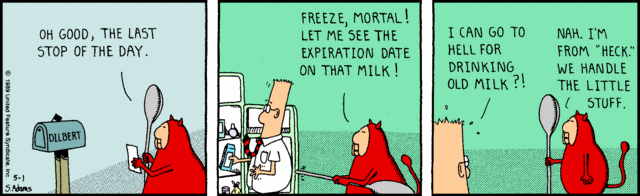
I have been told that it’s not becoming of a Christian soul to consign others to Hell, even in jest, regardless of the magnitude of their transgressions. Ultimate judgment does not rest in our hands, and in the end, we all fall short.

Heck, however, ruled over by Phil, the Prince of Insufficient Light, is another matter.


©1989 United Features Syndicate

Every now and then, some piece of hqiz software that I install brings an unpleasant and unexpected “bonus” along with it: the infestation of my browsers with “Bing.”

My home page gets changed, my search engines get shuffled, my URL search bar default is hijacked, and I’m gifted with an unasked-for toolbar.

And mind you, I’m very careful when installing things to uncheck all the little extras that many packages hope you’ll opt-in for.

Surely people who write such installation packages deserve to spend Eternity in Heck.

If you’re a Firefox user and this has happened to you, here’s how to exorcise the demons.


1) Close Firefox, and via Control Panel, navigate to “Uninstall or Change a Program”. I’m using Win7 Professional, but all recent Windows operating systems have some variation of this. Look for and nuke anything that says “Bing” in it. This should get rid of the Bing toolbar.

2) Open Firefox, go to Tools/Add-ons. Look at both “Extensions” and “Plug-ins” and clobber anything that says “Bing” in it.

3) Next to your URL bar you’ll see something that looks like this:

By clicking on the little triangle, you’ll get a drop-down menu. Choose the option that says “Manage Search Engines.”

If Bing is there, make another option your default search engine, move it to the top, and delete Bing. Delete it hard, and sing “My Way” while you do it.

4) This is the tricky one, because it’s buried deep. If you type key words in your URL bar, you’ll be redirected to some Bing search helper.

This will return the default URL search results to Google. If you want another search engine here, you’ll have to hunt around for the appropriate string – Google is all I ever use.

That should do it. If you execrate Bing as much as I do, perhaps you will find this useful if you have ever been “Bung.”

You’re welcome.


But you know what’s driving me nuts? I have followed my own advice, and what I find is that replacing Keyword:URL only works for the current session. As soon as I close and re-open Firefox (currently v. 15.0), the value pops back to “http://search.conduit.com/ResultsExt.aspx?ctid=CT3072253&SearchSource=2&q=”

Now I really want to slap someone. That’s just downright dirty. I’ve searched my registry (Win7 Pro, 64-bit) and “search.conduit.com” doesn’t exist anywhere as a key. I’m totally at a loss to what to do next.


At least I was, until I finally found what I desperately hope to be the proper solution.