Surfing around for a picture I was looking for yesterday, I came across this warning:
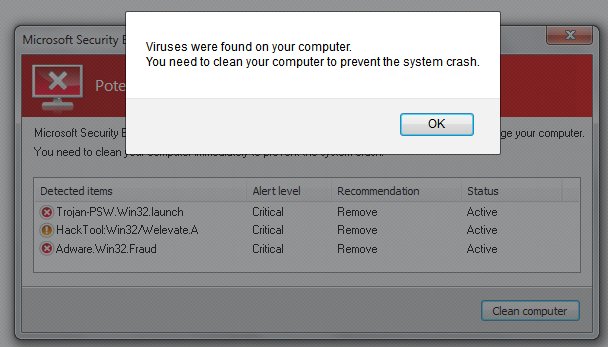
Since I had recently switched from AVG Free to Microsoft Security Essentials (it seems to work just as well, and doesn’t consume anywhere near as much CPU overhead, just for the record), it caught my attention. However, the strange English also caught my attention.
Clicking on the OK button, the full alert became visible:
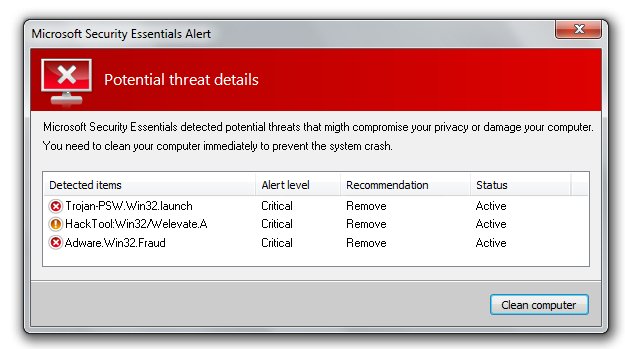
Again, there’s that “to prevent the system crash.” Microsoft may be guilty of useless error messages and worthless help files, but at least they use correct English. Hovering my mouse over the “Clean Computer” button showed a redirect to some alphabet-soup URL, meaning that anyone who clicks that button will be redirected to a site which will load the victim’s computer up with trojans, viruses and malware, oh my. The last insult is that the warning crippled the “Back” button in Firefox, so I had to close it out and restart to get off the page.
Be careful out there, folks. Just because you get a warning like this on your screen doesn’t mean your computer is infected. If you’re already using a reliable Malware scanner, you are most likely protected. Take note of the page (so you don’t go back) and get away from that URL as quickly as possible. Odds are you still have a clean computer.
The Old Wolf has spoken.
 Playing in the World Game