Microsoft “non-support” – I’m not just blowing smoke here.

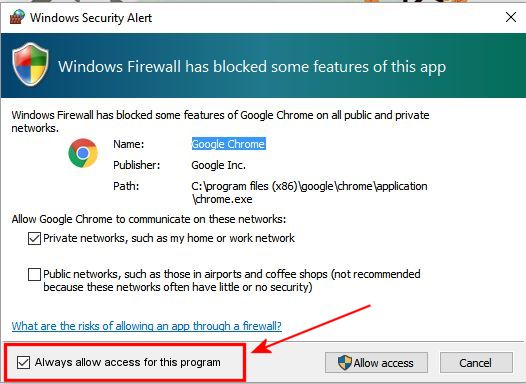
In my previous post, I ranted a bit about Microsoft’s efforts to alienate their customers by making competing or foreign programs (like Chrome – horrors!) incompatible or forcing them to ask permission to run, every time. We’re talking Windows 10 here, the latest and greatest.

Here’s an old joke, but one which remains totally valid in the 21st century:

A helicopter was flying around above Seattle when an electrical malfunction disabled all of the aircraft’s electronic navigation and communications equipment. Due to the clouds and haze, the pilot could not determine the helicopter’s position and course to fly to the airport. The pilot saw a tall building, flew toward it, circled, drew a handwritten sign, and held it in the helicopter’s window. The pilot’s sign said “WHERE AM I?” in large letters. People in the tall building quickly responded to the aircraft, drew a large sign and held it in a building window. Their sign read: “YOU ARE IN A HELICOPTER.” The pilot smiled, waved, looked at her map, determined the course to steer to SEATAC airport, and landed safely. After they were on the ground, the co-pilot asked the pilot how the “YOU ARE IN A HELICOPTER” sign helped determine their position. The pilot responded “I knew that had to be the Microsoft building because, like their technical support, online help and product documentation, the response they gave me was technically correct, but completely useless.”

One would think that after all these years as the 900-lb gorilla in the software space, someone at Microsoft would wake up and realize that this is a critical failing that generates massive ill will toward the company.

No, I’m not blowing smoke. Here’s an example, related to my last post.

I went to the Microsoft support site today, and asked a simple question: “Why does Windows Firewall in Win10 block Google Chrome?”

Here’s the page that comes up – one relevant to Windows Vista, dated 2011.

Someone named “Samuthra G,” tagged as a Microsoft agent, replied:

Hi,As the issue is with Google Chrome I would suggest you to post your query in the Google forum for better assistance:
http://www.google.com/support/forum/p/Chrome

And this was designated as the “most helpful” response. Thank you so much, Microsoft and Samuthra G; nothing like blowing an unhappy customer’s problem off by blaming someone else.

Two months later, a user named “Karmana” followed up with the perfect response:

Why is it, over the years, that I have noticed the vast majority of supposed Windows or Microsoft higher-certified helpers cannot seem to actually read the questions asked by the original poster?  Samhrutha, your answer to QW_895 is not only unhelpful, but if you were/are a Microsoft employee, then it is also highly irresponsible to blow off the OP by saying, “It’s not our problem.”  Taking responsibility for one’s own products is a strong first step in positive Public Relations!

To this day, this is my boilerplate experience with Microsoft forums. First of all, the people who answer never give a relevant answer – it probably has to do with the fact that their first language is not English, and that they’re paid pennies per hour to respond to these questions. Second, if they do give a response that’s even on-topic, it’s almost always so technical as to be incomprehensible or un-implementable by the average user.

Today I tried contacting the Microsoft support site, just to see what happens:
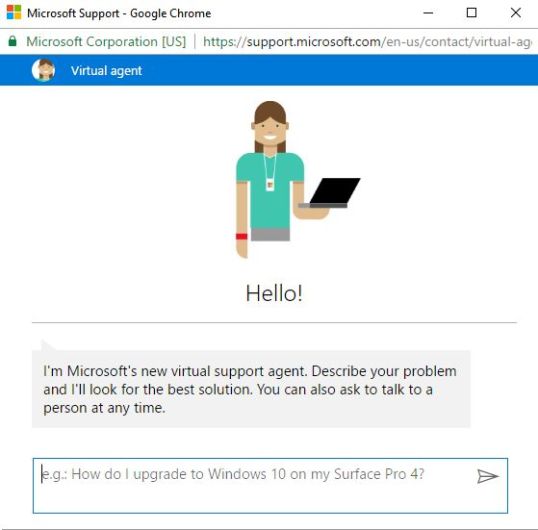
support

Having already tried a search without success, I figured I’d take advantage of their offer:
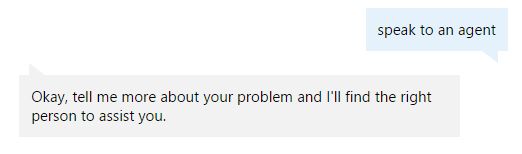
support-2

So I entered my question again: “Why does Win10 firewall block Chrome?” What I got was a list of articles – and once again, the most relevant hit is the worthless exchange I referred to above.
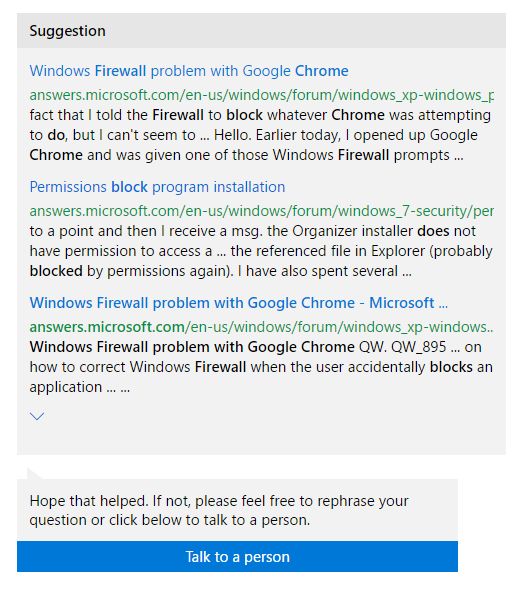
support-3

So I clicked the “Talk to a person” link, and was connected via Chat to a friendly Microsoft agent somewhere on the other side of the world.

“Clarisse” asked me some questions about which version of Windows I was using, provided a case number, and ended up suggesting that I uninstall and reinstall Chrome. So just for the hell of it, I gave that a try – predictably, without success. These agents in India or wherever are minimally trained, minimally paid, and working from scripts without much understanding of what’s happening under the hood.

If I wanted, I could pay $149.00 per year for premium Microsoft support, which would allow me to ask questions at any time and also enable remote desktop support, but I somehow feel that paying for support to solve problems that Microsoft generates is probably not the best allocation of my resources.

The challenge is that Microsoft is so widely accepted as the de-facto standard in the business world that people need it to conduct their daily affairs, and most people would rather muddle along with the best they can do rather than delve down into the guts of an operating system to try to find a fix or a workaround. Microsoft knows this, and based on results, they don’t care to spend any time, effort, or money to improve their byzantine and useless support system.

It’s sad. For myself, I don’t really feel like facing the Linux learning curve, and I’m seriously afraid of something like this:
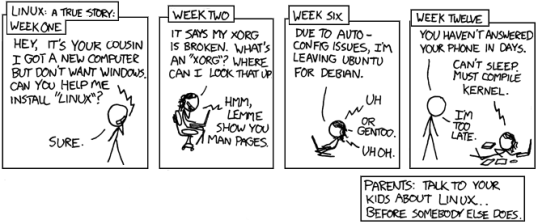
cautionary

As for Apple, I love the idea of the Macintosh platform, but unless the company brings their prices in line with PC hardware, I won’t be able to justify the expense. From a functionality standpoint, the lines between PC and Mac world have blurred considerably since 1984 when the Mac was introduced as the sexy computer for the rest of us, so the draw has diminished substantially.

Still not a happy camper.

The Old Wolf has spoken.
Dear Microsoft, are you *trying* to piss of your user base?

Really, this is beyond stupid.

Example 1:

chrome

Google Chrome? Really? Is it not enough that the entire world knows that IE and Edge are the most execrable browsers around, now you have to block Chrome in Windows 10 every time it launches?

How hard would it be to do something like this?

chrome2

How screeching hard would it be? Unless someone with a brain the size of a walnut and the ethics of a honey badger sitting in some conference room somewhere said, “No, let’s make it as hard as possible for people to use competing products.” Oh wait, Microsoft would never do something like that.

Microsoft initially tried to eliminate the threat non-Microsoft browsers posed to the applications barrier to entry by attempting to bribe, and later threatening, Netscape into giving up its core Window 95 web-browsing business. Had Netscape accepted Microsoft’s market-division proposal, Microsoft would have succeeded in killing the browser threat in its infancy and likely would have acquired a monopoly over browsers. (US Department of Justice, U.S. v. Microsoft)

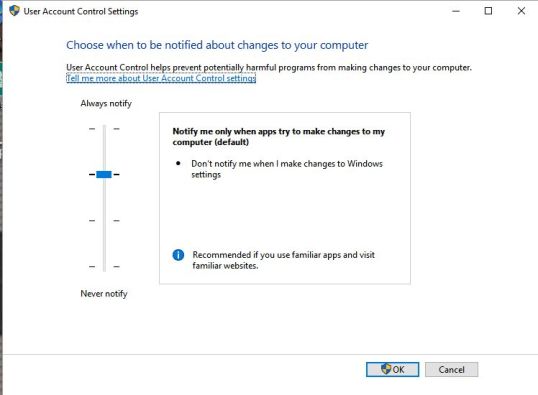
The only option is to modify your global security settings, which is generally a crappy option. There are reasons why this security warning is in place, and it can protect your machine from malicious things, so that’s a poor solution.

account-control

Example 2:

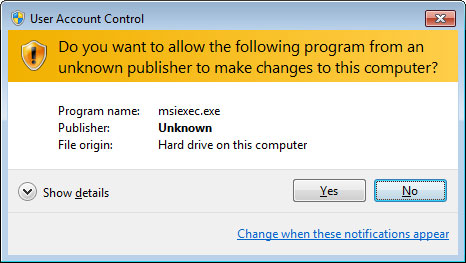
A popup I get when I try to run older software that used to work well in Win7 (these examples are for msiexec.exe, but the name changes depending on the program selected):

msiexec_exe_trojan

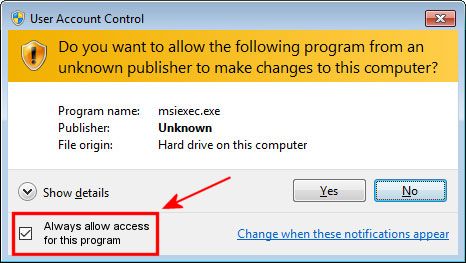
Again, Microsoft: would it have killed you to put something like this in your code?

msiexec_exe_trojan-2

This solution would be so simple, and yet in its absence, the solution is terribly complex and ultimately unsatisfactory. Microsoft support websites are typically run by people in other countries whose first language is not English, who have poor understanding of the questions asked, and who provide generally useless information.

Given these frustrations with Win10, I find this old gag somehow more relevant than ever.

If GM had developed technology like Microsoft, we would all be driving cars with the following characteristics:

1. For no reason at all, your car would crash twice a day.
2. Every time they repainted the lines on the road, you would have to buy a new car.
3. Occasionally, executing a manoeuver such as a left-turn would cause your car to shut down and refuse to restart, and you would have to reinstall the engine.
4. When your car died on the freeway for no reason, you would just accept this, restart and drive on.
5. Only one person at a time could use the car, unless you bought ‘Car95’ or ‘CarNT’, and then added more seats.
6. Apple would make a car powered by the sun, reliable, five times as fast, and twice as easy to drive, but would run on only five per cent of the roads.
7. Oil, water temperature and alternator warning lights would be replaced by a single ‘general car default’ warning light.
8. New seats would force every-one to have the same size butt.
9. The airbag would say ‘Are you sure?’ before going off.
10. Occasionally, for no reason, your car would lock you out and refuse to let you in until you simultaneously lifted the door handle, turned the key, and grabbed the radio antenna.
11. GM would require all car buyers to also purchase a deluxe set of road maps from Rand-McNally (a subsidiary of GM), even though they neither need them nor want them. Trying to delete this option would immediately cause the car’s performance to diminish by 50 per cent or more. Moreover, GM would become a target for investigation by the Justice Department.
12. Every time GM introduced a new model, car buyers would have to learn how to drive all over again because none of the controls would operate in the same manner as the old car.
13. You would press the ‘start’ button to shut off the engine.

Oh yeah, and all the owner manuals would be written in Danish.

Yarg. old_wolf_angry

The Old Wolf has spoken.

Foistware (or: Unwanted Software While Installing)

I wrote a few years ago about stealth installs, but the practice continues; I thought I’d give another example of what to watch out for.

Today I updated a couple of modules of Free Studio from DVD Video Soft; notice I link to them because they provide a really useful suite of products that work well, for free. I get that they don’t do this as a labor of love – they need to monetize this somehow, and I suspect the foistware issue continues because it helps the bottom line. So be it – but the consumer should be aware of the rules of the game, because what you get is often not what you want or need.

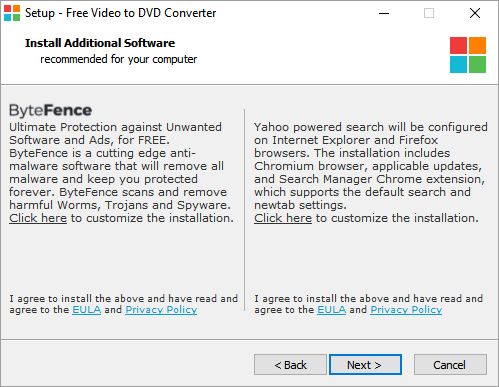
During the install, you get this dialog box. It tells you exactly what you’re going to do to your computer, so nothing is really hidden there.

Foistware 2

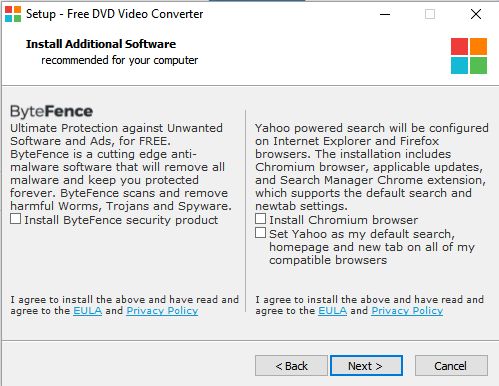
If you just go ahead and click the “next” button, you’ll be installing bytefence, Chromium (an open-source version of Chrome that doesn’t really work that well in the Windows environment), and YahooEverywhere, which will be difficult to remove if you don’t know what you’re doing.  It’s not until you click the “Click here to customize the installation” link that you see exactly what’s going to happen, and get to uncheck the boxes.

Far too many people, when installing software, just go NextNextNextNext, without reading what the boxes say. After all, who really reads the EULAs or is telling the truth when they click the “I have read and agree” button? We’d spend half our lives plowing through byzantine legalese if we did, and I’m still not convinced any of these agreements would hold up in court.

Foistware

“Set Yahoo as my default search, homepage and new tab on all my compatible browsers.” Uh, no.

From where I sit this is just not an ethical business model, because it takes advantage of consumer unawareness. In my previous article I mentioned Oracle, who for the longest time tried to cram the “Ask” toolbar and search engine down people’s throats when they installed or updated Java. I don’t know if they are still doing that or not, but I always thought it was supremely douchey because Ask is a supremely intrusive and essentially worthless software package.

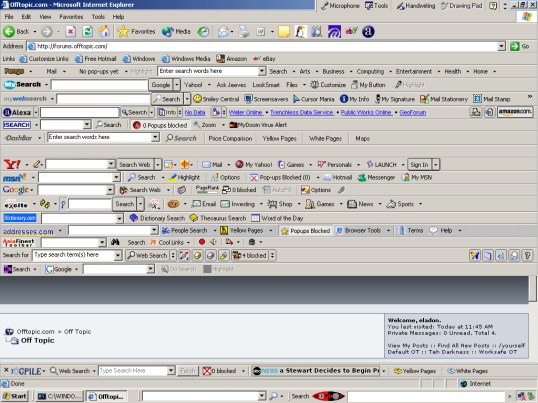
Just be careful. When you install software, read each menu and see what’s being installed/offered. Deselect things you don’t want, and you’ll avoid a host of problems down the road. Unless you want your browser to look like this:

toolbarhell

The Old Wolf has spoken.


go0dvinez: Malware Central

With uBlock Origin attached to Chrome and a host of other malware protections on my computer, I almost never see ads, spam, malware, popups, popunders, or any such things.

My phone is not so fortunate.

Recently I’ve checked out a couple of things on my Android that had shown up on my Facebook wall, and it’s been a long time since I’ve seen such a blatant effort to redirect, scam, browser-hijack, deceive, and annoy visitors as I experienced today with go0dvines.com (don’t go there.)

When you get a link like [http://go0dvinez.com/bakla-m3t-gayam-t-loko-ka-barok-xyter-iexsa-sonnn-off/], you know something is going to be off in the first place – but that didn’t show up until I did some researching on my desktop. On the phone, as soon as you hit the site, you’re immediately taken on like a six-level-deep redirect, and this is what you see:

This slideshow requires JavaScript.

I don’t even want to think about what kind of insidious garbage you wuld be downloading to your handheld device if you followed those links or clicked on the install buttons. One of them completely locks your browser; the only way out is to restart.

This is internet evil in its most distilled form, topped only by ransomware viruses and the unspeakable horrors of the deep web where few of us ever wander.

Stay away from this website, and if you see strange things happening to your phone when you follow a link, get out of there as fast as you can. Legitimate websites will never give you virus popup warnings like this.

Be careful out there.

The Old Wolf has spoken.

Nine more Crypto Emails

Today in the mail, another gush of spam emails, each one with a .zip attachment labelled “invoice” or “statement” or “employees” or some other innocuous title. Each one containing a .js (javascript) file which would download encryption software, corrupt my files, and demand a ransom. Please do not be victimized by these criminals.

From: Carole Middleton <MiddletonCarole95@bol.net.in>
Subject: [SPAM] Re: Chart of Accounts
hello info,
You may refer to the attached document for details.
Regards,
Norma Palmer

From: Beatrice Salinas <SalinasBeatrice75015@slotcarsdirect.co.uk> Subject: [SPAM] FW: vendors

Hi info
The attached spreadsheet contains bills. Please review
Regards,
Beatrice Salinas

From: Devon Garcia <GarciaDevon55@uid.uk.com>
Subject: [SPAM] Re:

Hi info,
As promised, the document you requested is attached\
Regards,
Devon Garcia

Subject: [SPAM] Emailing: Photo 05-11-2016, 98 43 44

Your message is ready to be sent with the following file or link attachments:
Photo 05-11-2016, 98 43 44
Note: To protect against computer viruses, e-mail programs may prevent sending or receiving certain types of file attachments.  Check your e-mail security settings to determine how attachments are handled.

Note: How kind of them to warn me against viruses.

Subject: [SPAM] Emailing: Photo 05-12-2016, 64 94 68

Your message is ready to be sent with the following file or link attachments:
Photo 05-12-2016, 64 94 68
Note: To protect against computer viruses, e-mail programs may prevent ending or receiving certain types of file attachments.  Check your e-mail security settings to determine how attachments are handled.

From: Kareem Sweeney <SweeneyKareem2103@residenceferrucci.it>
Subject: [SPAM] Re:

hi info,
As promised, the document you requested is attached
Regards,
Kareem Sweeney

From: Kristine Brennan <BrennanKristine0377@lemmertzturismo.com.br>
Subject: [SPAM] build assemblies

hello info
Attached please find the build assemblies report for your review
Thank you.
Regards,
Kristine Brennan

From: Mable Ward <WardMable44090@cmsadv.com.br>
Subject: [SPAM] FW: invoices

Hi info
The attached spreadsheet contains employees. Please review
Regards,
Mable Ward

From: Milagros Wiley <WileyMilagros41@telefonica.de>
Subject: [SPAM] receive payments

hello info
Attached please find the receive payments report for your review
Thank you.
Regards,
Milagros Wiley

From: Norma Palmer <PalmerNorma3969@jpowerassembly.org>
Subject: [SPAM] Re: Chart of Accounts

hello info,
You may refer to the attached document for details.
Regards,
Norma Palmer

I post these only in case people out there are searching the web for similar messages.

Be clear: THESE MESSAGES CARRY ENCRYPTION VIRUSES. Do NOT open the attachments!

Be careful out there

The Old Wolf has spoken.

Ten Crypto-Emails in a Single Day

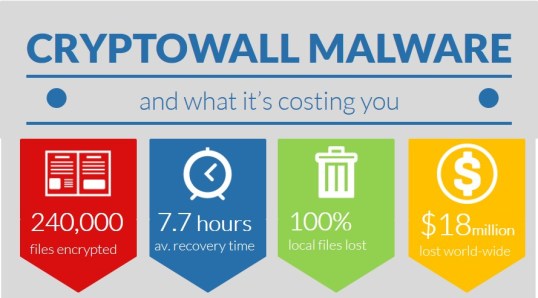
Please, please, be careful out there. The Crypto-scammers are ramping up their game.

cryptowall-infographic-enews

Below are eight of the ten spam emails I received only today. Each one was equipped with its own attachment, which would have doubtless encrypted my entire computer.

1)

To: “redacted”
From: Norman Baldwin <BaldwinNorman31872@jawhar9.com>

Subject: Second Reminder – Unpaid Invoice

We wrote to you recently reminding you of the outstanding amount of $7096.64 for Invoice number #18268E, but it appears to remain unpaid.

For details please check invoice attached to this mail

Regards,
Norman Baldwin
Deputy Director of Finance

2)

To: “redacted”
From: Olive Booth <BoothOlive804@beamtele.net>

Subject: Re:

Hello, info

Please find the document file attached to this mail. The attached file contains transfers and invoices history of your bank account

Regards,

Olive Booth

3)

To: “redacted”
From: Greg Maynard <MaynardGreg93@agenciaH.com>
Subject: Re:

Good evening info,
As promised, I have attached the spreadsheet contains last 50 transaction and your account actual balance.
Regards,
Greg Maynard

4)

To: “redacted”
From: Dolly Browning <BrowningDolly48549@feoliveira.com>

Subject: RE: Outstanding Account

This is a reminder that your account balance of $5315.75 was overdue as of 25 April 2016.

Enclosed is a statement of account for your reference.

Please arrange payment of this account today or, if you cannot make full payment at this time, please contact us to make a payment arrangement that is mutually acceptable.
Regards,

Dolly Browning
CEO, Cafedirect

Have a nice day

Yeah, I’d have a really nice day if I opened your attachment and all my files were encrypted. Shove it where the sun don’t shine, fool.
5)
To: “redacted”
From: Clarissa Ewing <EwingClarissa61@betonfiguratie.nl>

Subject: Re:

Hello, info

Please find the document file attached to this mail. The attached file contains transfers and invoices history of your bank account.

Regards,
Clarissa Ewing

6)

Subject: Ticket
From: Alma cawley <Veronica344@gmail.com>

To: redacted

Content-Type: application/zip; name=”TICKET-T1153854633273.zip”
Content-Disposition: attachment; filename=”TICKET-T1153854633273.zip”
X-Attachment-Id: 90725767494-local0


7)

To: “redacted”
From: Guadalupe Oneal <OnealGuadalupe459@sanctuaryandcare.com>

Subject: FINAL NOTICE – OUTSTANDING ACCOUNT

Dear Client, We are writing concerning the amount of $3339.41 which was due to be paid on 01.05.2016 and, despite numerous requests for payment, remains outstanding. Details attached to this email. We demand that payment of the full amount be paid to us on or before 10.05.2016. If this account is not resolved by the specified date we reserve the right to commence legal proceedings to recover the debt without further notice to you, and you may be responsible for any associated legal fees or collection costs. If you wish to prevent this, please contact the undersigned as a matter of urgency and settle your account before the above date. Regards, Guadalupe Oneal Head of Finance UKGI Planning

 8)
To: “redacted”
From: Tad Whitney <WhitneyTad085@tecktranslations.de>

Subject: FINAL NOTICE – OUTSTANDING ACCOUNT

Dear Client, We are writing concerning the amount of $6958.82 which was due to be paid on 01.05.2016 and, despite numerous requests for payment, remains outstanding. Details attached to this email. We demand that payment of the full amount be paid to us on or before 10.05.2016. If this account is not resolved by the specified date we reserve the right to commence legal proceedings to recover the debt without further notice to you, and you may be responsible for any associated legal fees or collection costs. If you wish to prevent this, please contact the undersigned as a matter of urgency and settle your account before the above date. Regards, Tad Whitney Chief Technology Officer

Even if an email claims you owe them money, if it threatens you, even if it looks like a legitimate invoice, even if it comes from someone you think you know, NEVER open attachments – especially .zip files – without verifying what it is and who it comes from.

Working as I do for a first-rate cloud backup company, I have noticed a definite uptick in people calling in for help to recover their files after having everything they own encrypted, and being blackmailed for anywhere between $300 and $2000 to get their data back (and there’s no guarantee the criminals will send them a decryption key even if they pay.)

carbonite-logo

You may want to consider these folks. They keep up to 12 versions of your data, making you almost Crypto-proof. This article at the New York Times mentions them by name.

The internet has made it excruciatingly easy for human scum to perpetrate financial crimes on their victims. Please be careful and don’t become one of those victims.

  1. Never open attachments from unknown senders.
  2. Keep your anti-virus software up to date.
  3. Back up your data safely.

The Old Wolf has spoken.

Malware Payloads

Chapa NO MALWARE

I’ve noticed a lot of malicious emails coming through to one of my addresses lately – interestingly enough not at Gmail, which may even filter these things out before they are even sent to Spam – but to one of my private email addresses. Here are two examples:

Dear info,

Many thanks for your card payment. Please find payment confirmation attached below. Should you have any queries, please do not hesitate to contact Credit Control Team.

Best regards

Dena Carpenter
Director Audit Services
Attachment: 851E2_info_43A8AE.rar
And this one:
Dear info,
Please check the bill in attachment.
In order to avoid fine you have to pay in 48 hours.
Best regards
Antonia Snider
Executive Director Sales Account Management Training Performance Support
Attachment: info_e-bill_669770.zip
Both of these emails came with compressed attachments, one a .zip file and one a .rar file. Inside each was a document with the extension “.js,” meaning it’s a javascript file which would automatically run once the file was clicked on to see the “invoice”or “bill.”

DO NOT DO THIS.

From Microsoft’s Malware Protection Center:

Payload: Downloads malware or unwanted software

This threat can download other malware and unwanted software onto your PC. We have seen it download the following threats:

  • PWS:Win32/Fareit
  • Ransom:Win32/Crowti.A

Connects to a remote host

We have seen this threat connect to a remote host, including:
  • davis1.ru using port 80
Malware can connect to a remote host to do any of the following:

  • Check for an Internet connection
  • Download and run files (including updates or other malware)
  • Report a new infection to its author
  • Receive configuration or other data
  • Receive instructions from a malicious hacker
  • Search for your PC location
  • Upload information taken from your PC
  • Validate a digital certificate

We have seen this threat access online content, including:

  • two.jpg
  • one.jpg

Another similar threat is 097M/Donoff. This Microsoft Article shows many types of emails that are being sent out to try to get people to run this malware. One of my emails contained Win32/Penzievs, which is so new that Microsoft has no technical details on it yet.

Working at Carbonite™, we have seen many customers who have been infected by the Cryptolocker virus and similar encryption programs. Almost all of these vicious payloads come as email attachments that are opened by the unwary. While having good anti-virus protection and a rcloud-based backup system that protects multiple versions of your files is good insurance, the best procedure is never to open attachments from unknown sources, no matter how legitimate they look. Especially always avoid “.exe,” “.com,” “.zip,” and “.rar” files.

Be careful out there. Protect yourself and your loved ones.

The Old Wolf has spoken.

 

What the hqiz is a skeuomorph?

Is it this?

xenomorph

Nah, that’s the xenomorph from the almost-forgotten TV drama, “Something is Out There.” For what it’s worth, it was quite terrifying at times, but noteworthy as it used this term long before the “Alien” franchise was born.

This is a skeuomorph:

save-icon-614x460

It will be easily recognized as the universal “save” icon in many computer programs. But floppy disks are no longer used for saving things (for the most part,) and many young people have probably never even seen or held one.

Wikipedia defines a skeuomorph thusly:

[It] is a derivative object that retains ornamental design cues from structures that were necessary in the original. Examples include pottery embellished with imitation rivets reminiscent of similar pots made of metal and a software calendar that imitates the appearance of binding on a paper desk calendar. The term ‘skeuomorph’ is compounded from the Greek: skéuos, σκεῦος (container or tool), and morphḗ, μορφή (shape). It has been applied to material objects since 1890 and is now also used to describe computer and mobile interfaces.

Webster’s 3rd International Dictionary contains 472,000 words, of which I know but a fraction. Despite the fact that my education has not been wanting and it takes a concerted effort to get me scurrying to the dictionary, this was a new one on me and I learned it over at reddit. It’s kind of like octothorpe, the ten-dollar word for the hash mark, number sign, or pound sign (#) now so commonly used at Twitter and elsewhere. #insanity

Some other examples of skeuomorphs:

800px-Aeg_peter-behrens03

An electric kettle in the form of a stove-top kettle.

Chrysler_Town_&amp;_Country_Convertible_(Centropolis_Laval_'10)

This woody-style car, where the false wood grain is not part of the vehicle’s structure.

Redstair_GEARcompressor

Sofware interface for an audio program, designed to look like a physical device.

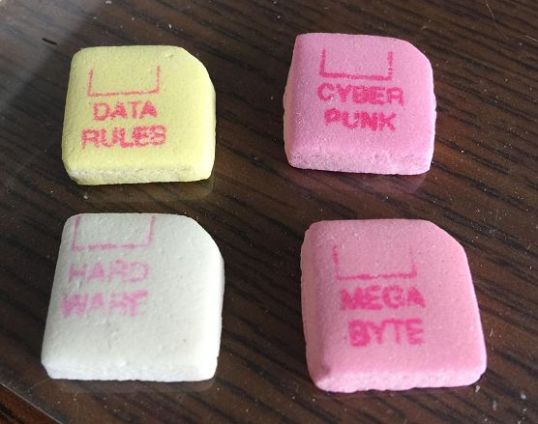
What got me thinking about this is a picture of some really old candy-heart type floppy disks that must have been manufactured in the 80s or thereabouts:

candy disks

Back then, these would have been much more recognizable than they are today.

So remember that the next time you click on the little disk icon to save your document, you’re using a skeuomorph.

The Old Wolf has spoken.

No Wi-Fi for me at Motel 6 tonight

Edit: as of this morning, February 9th, whatever glitch they were experiencing has been repaired. So props to the local establishment, but still scratching my head that the national helpline considers this place outside of their purview.

Driving back from a visit to New York City and parts south this last week, I was overtaken by a blizzard which caused all sorts of havoc throughout New England. I stopped at a Motel 6 in Milford, CT, just a little bit down the road from where there was a horrific bus crash about an hour later. It’s been blizzarding all day, and I’m glad I made the choice to hole up rather than to proceed.

My experiences at Motel 6 around the country have been almost uniformly good, except for one nightmare in Toledo, Ohio which I won’t go into here. This particular property is very nice, more upscale than most I have stayed at. But for some reason, I was unable to connect to their Wi-Fi.

My cell phone detected Wi-Fi signal and connected all right, but when I went to the login page to enter my code, what I got is this:


This webpage is not available

ERR_SSL_VERSION_OR_CIPHER_MISMATCH

Details

A secure connection cannot be established because this site uses an unsupported protocol or cipher suite. This is likely to be caused when the server needs RC4, which is no longer considered secure.


I explained the situation to the desk clerk, and he told me that he was aware of the problem, and that the location had recently installed new equipment. He was, however, unable to help me solve the problem.

I thought I would give the national feedback line a try, and sent them an email via their website. They responded promptly and suggested that I call their Wi-Fi hotline; unfortunately, the phone number they gave me was for Resorts World Bimini. After another exchange, in which I got the correct number (a single digit was transposed), I called said helpline only to be informed that I was staying at an “unsupported property.”

That makes no sense to me, but it appears that not all Motel 6s are created equal. Apparently if you want tech support, you can’t be staying at a franchise location. At least that’s what the lady on the other end of the line told me.

So no Netflix for me tonight. With luck, the weather will permit me to get back to Maine tomorrow.

The Old Wolf has spoken (via 4G).

Here’s why you do external backups

ransomware

The BotNet distributing the original Cryptolocker was taken down (I’ve mentioned this malware multiple times), and many people were able to get their data back – but there are still many malicious clones of this supremely evil malware floating around out there.

Per this article (in Norwegian, but you can use Google Translate to get a good gist of its meaning in English), if your files have been encrypted, you’re pretty well screwed. Your only options are to pay the ransom (which does not guarantee that you will get a decryption key) or bring your files back from a non-connected, external backup – this because the encrypting malware can affect cloud storage as well either directly or indirectly.

To protect yourself from this sort of data horror:

  1. Back up your files to an unconnected external drive regularly
  2. Never open email attachments from unknown people, no matter how legitimate they may look

Hell is going to be a busy place. Be careful out there.

The Old Wolf has spoken.