Notice to Appear in Court (Scam/Malware)

bigstock-Malicious-malware-warning-mess-41722204-1024x819

(Thanks to Techsrus for the image)

My cubicle neighbor (at the job we just both got laid off from yesterday, but that’s another story) showed me a couple of emails he had gotten in his Gmail account – each sported the header “Notice to Appear in Court.”  I told him they were probably scam threat letters and hoping to extort money.

I got one myself today, and decided to explore it a little further.

—————-

From: “Notice to Appear in Court” <customerssupport231@kaiserarbitrationlawyers.com>
To: <redacted>

Subject: Notice to appear in court SN8157

Notice to appear in court,

Hereby you are notified that you have been scheduled to appear for your hearing that will take place in the court of Detroit in April 03, 2014 at 11:30 am.You are kindly asked to prepare and bring the documents relating to the case to court on the specified date.The copy of the court notice is attached to this letter. Please, read it thoroughly.
Note: The case may be heard by the judge in your absence if you do not come.Yours very truly,
SAMPSON Hays
Clerk of court
—————————–
Attached was a file called “Notice_to_Appear_TY4769.zip”
Unpack this zip folder and you find a file called “Court Notice.exe”. That file lasted less than one second on my desktop, as Microsoft Security Essentials immediately quarantined it. The .exe file contained a Trojan Downloader named Win32/Kuluoz.D, which Microsoft describes as follows:
Win32/Kuluoz is a trojan that tries to steal passwords that are stored in certain applications and sensitive files from your PC. This trojan could also download other malware to your PC, like other variants of Win32/Kuluoz and Win32/Sirefef, and variants of rogue security software likeWin32/FakeSysdef and Win32/Winwebsec. This threat tries to hack your email accounts and file transfer programs.
In other words, really nasty stuff.
This is a perfect example of why you should do the following things on your computer to practice safe computing:

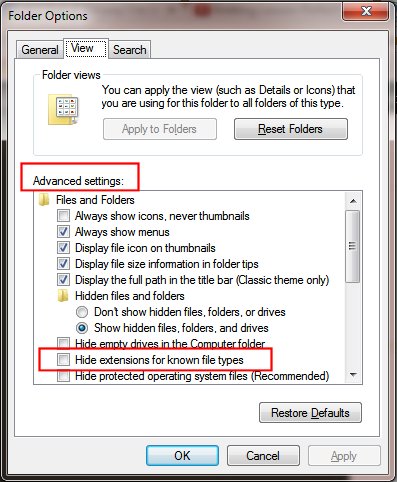
1. Always display file extensions. This option is turned off by default by Microsoft on its newer operating systems, which in my opinion is a dangerous and foolhardy idea. This means that instead of seeing “Notice_to_Appear_TY4769.zip” and “Court Notice.exe”, you would only see “Notice_to_Appear_TY4769” and “Court Notice.” To fix this, follow the procedure below for your operating system:

To show or hide file name extensions (Windows 7)

  1. Open Folder Options by clicking the Start button Picture of the Start button, clicking Control Panel, clicking Appearance and Personalization, and then clicking Folder Options.

  2. Click the View tab, and then, under Advanced settings, do one of the following:

    • To show file name extensions, clear the Hide extensions for known file types check box, and then click OK.

    • To hide file name extensions, select the Hide extensions for known file types check box, and then click OK.

Example

To show or hide file name extensions (Windows 8)

  • Open Windows Explorer and go to “View” and then click the Options button > Change folder and search options
  • Scroll to “Hide extensions for file types is known”
  • Uncheck it and click OK.

To show or hide file name extensions (Windows XP)

  • Double Click on My Computer.
  • Click on Tools > Folder Options… in the menus.
  • Click on the View tab.
  • Remove the check from Hide extensions for known file types.
  • Click the OK button.

2) Make sure you have robust malware detection software installed. AVG Free, Microsoft Security Essentials, and Kaspersky are all good options. The first two are free, the third reasonably priced and somewhat more robust than the other two.

3) ☞ NEVER ☜ open attachments from unknown senders, especially a file that contains “.exe” anywhere in its name.

(Did I make that emphatic enough? I’d make it blink if I could.)

A lot of folks are savvy enough to spot this as a scam in an instant, but this particular email is official-looking enough to scare a lot of vulnerable computer users; the scammers don’t care if you actually appear anywhere – they just want you to open that never-to-be-sufficiently-damned attachment. If you are technically savvy and you have loved ones, either elderly or otherwise vulnerable, watch out for them. Educate them. You don’t want them becoming victims of scams or nefarious behavior like botnets.

This has been an Old Wolf public service announcement.
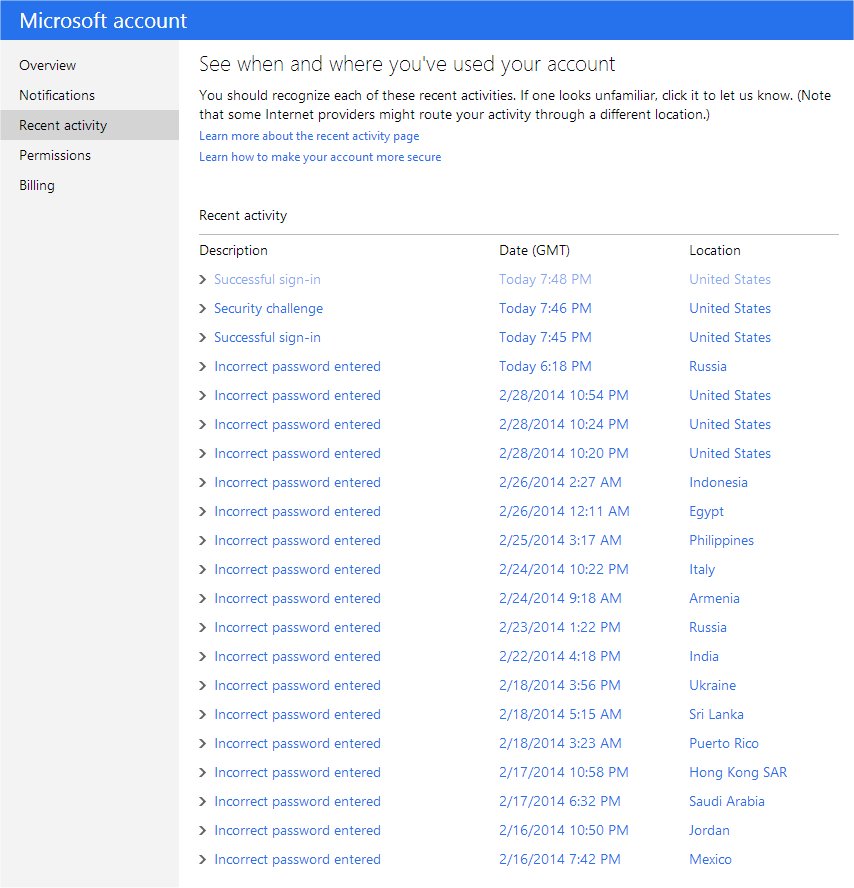
Hackers around the world

Holy Mother of Mogg!

I don’t use my Hotmail account very often, but I keep it around for a few odd reasons. I just saw a post at reddit and thought I’d better check my own account.

Hackers

And that’s only the last few days!

Folks wonder why their email accounts get hacked; with this kind of assault, if you don’t have a strong password, it’s very likely your email account will be taken over by some random hqiz-eater and used for sending out spam or malware.

Takeaway: Use Strong Passwords! In some ways it may be like keeping honest people honest, but for the average user, it’s usually the best form of prevention. As for the bottom-feeding scumbags, by the sacred skull of Mogg’s grandfather, may the universe reward them according to their works.

The Old Wolf has spoken.

Practice Safe Computing!

This can’t be stressed enough, or repeated often enough. Just got an email today in my business account that looked like this:

Dear Sir/Madam,

The attached payment advice is issued at the request of our customer.

The advice is for your reference only.

Yours faithfully,
Global Payments and Cash Management
HSBC

***************************************************************************

This is an auto-generated email, please DO NOT REPLY. Any replies to this email will be disregarded.

***************************************************************************
Security tips

1. Install virus detection software and personal firewall on your
computer. This software needs to be updated regularly to ensure you
have the latest protection.
2. To prevent viruses or other unwanted problems, do not open
attachments from unknown or non-trustworthy sources.
3. If you discover any unusual activity, please contact the remitter of
this payment as soon as possible.
***************************************************************************

*******************************************************************
This e-mail is confidential. It may also be legally privileged.
If you are not the addressee you may not copy, forward, disclose
or use any part of it. If you have received this message in error,
please delete it and all copies from your system and notify the
sender immediately by return e-mail.

Internet communications cannot be guaranteed to be timely,
secure, error or virus-free. The sender does not accept liability
for any errors or omissions.
*******************************************************************
“SAVE PAPER – THINK BEFORE YOU PRINT !

ttcopy.zip


Unfortunately, far too many people will be stung by a generic sounding email like this. “Wow, someone sent me money!” will be the initial response, and they’ll happily unzip and execute the attached “payment notice.”

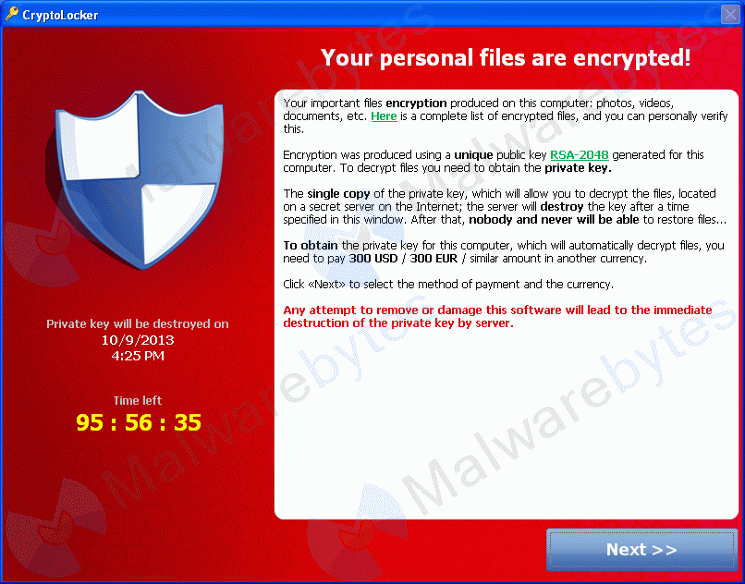
Unfortunately that attached file is not a payment notice, but an executable file (a program) which will infect your computer with malware, adware, spyware, and heaven knows what else; turn your machine into part of a robotic network (a botnet) for spreading spam and viruses, search for passwords and sensitive financial data, encrypt all your files and demand a ransom to unlock them (this is a particularly nasty one), or any number of other unholy things.

cryptolocker

I’m going to shout here: NEVER OPEN EMAIL ATTACHMENTS FROM PEOPLE YOU DO NOT KNOW AND TRUST!111

If WordPress supported blinking text, I’d use that obnoxious tag too, just to make sure I had your attention.

Be especially wary of any file that ends in “.exe”. This is one of the basic rules of safe computing, but far too many people don’t know about it. One of the worst things Microsoft ever did was to suppress the display of file extensions by default, assuming people didn’t care or wouldn’t understand what they are for. As a result, far too many people are simply ignorant of the dangers inherent in clicking email attachments that could be programs. All they would see in the above message would be “ttcopy.”

Notice the ironic security warning in the body of the email itself: “To prevent viruses or other unwanted problems, do not open
attachments from unknown or non-trustworthy sources.” This is misdirection at its finest; people will be grateful for the warning, if they even bother to read it, and happily execute the malicious payload.

The executive summary here: NEVER OPEN EMAIL ATTACHMENTS FROM PEOPLE YOU DO NOT KNOW AND TRUST!

The Old Wolf has spoken.

Excuse me while I turn handsprings

I have a lovely computer. It’s really the first time in my life I’ve had a machine that was more robust than my needs dictated; it’s a nice Dell i7 core box running Win7 Pro and it runs like greased lightning. But over the past year or so, I’ve been plagued by one glaring problem that I couldn’t diagnose properly… until tonight.

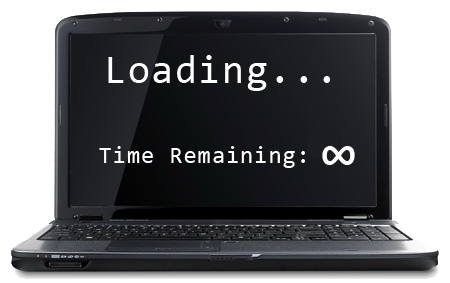
slow-computer

It was my context menus. Right-click on anything, and that dratted menu would take about 30 seconds to pop up. When you’re working away at a project, you need speed and responsiveness, and this was getting worse and worse. Googling suggested the problem was in a defective context-menu handler, probably a third-party one, and recommended a number of long, involved, and messy investigations. I installed ShellExView and disabled shell extensions one by one, or in clusters using a binary search pattern, but nothing helped. Nothing. Ploret des yeulx, ma barbe blanche tiret, I was about to slit my wrists in frustration – but I finally found the culprit, something that didn’t show up in shell extensions or elsewhere: MPCBContextMenu. It’s a context menu handler that was installed on my system along with JustCloud, my current backup program.

JustCloud works well, I have unlimited storage, it backs up my stuff quietly and unobtrusively, and it was fairly cheap for a two-year plan. But this particular .dll file is a steaming mass of camel ejecta, and just pulling it out of my Program Files directory and re-booting solved the problem.

There are hardly words to express my relief. By the silken breast of Mogg’s mother – if you are having the same difficulty, go search for this file. It’s probably in your program files (x86) directory under JustCloud. Kill it. Exterminate it. BURN it with FIRE!

The Old Wolf rejoices.

Memory Lane: Laser Printers and Other Ephemera

(Cross-posted from Livejournal)

Laser printers have come along way. These days you can buy one for almost nothing, and avoiding the manufacturer’s scam by having your cartridges refilled makes using them pretty cost-effective.

The first laser printer I ever saw was the size of a small web press, used by the State of Washington in 1980 to print its payroll checks. The next one I encountered had shrunk considerably:

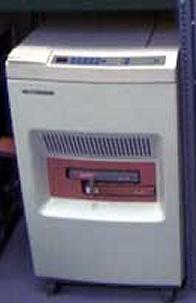
192758_original

This is actually the Xerox version of the Wang LPS-12 (or LIS-24) laser printer, which would manage 12 or 24 pages per minute. We had several of them in the Translation Department of the Church of Jesus Christ of Latter-day Saints, and they got heavy use because we were able to dive into the font files and character mapping tables and tweak the characters to customize Wang’s OIS system for 116 languages instead of the 16 supported ones. I recall loading these onto hand trucks and moving them from office to office occasionally, as we had one physical location that for security purposes could not be connected to the outside world. Toner was loaded in bulk from large gallon bottles, and could be supremely messy.

After decades of searching, the Internet finally disgorged this cartoon, seen in the November 15, 1988 issue of PC Magazine:

Laser Printer Mr. Bond

The same printer in its original incarnation was also used with our Xerox Star 8010 system and its successor, the 6085.

192814_600

This system was the result of research at the Palo Alto Research Center (PARC), and had Xerox been as good at marketing as Steve Jobs, we might be using Xerox iMacs today. You can see the GUI elements, graphic capability and multilingual fonts that the Macintosh was so successful at popularizing, here being used years before the Macintosh hit the market.

Going even farther back, I was reminded of the first electronic calculator I laid hands on in 1968, the Wang 320SE. It had four nixie-tube terminals connected to a central processing unit, and I remember prominent instructions on each terminal never to do bad things like dividing by zero or setting up any trig function that resulted in an undefined result, because it would crash the CPU and take 3 hours to reboot, or some such nonsense.

193052_original
193597_original

Sheesh. My Droid may have more computing power than the room-sized Univac 1108 I learned to write Fortran code on in 1969.

193404_original

Memories. They’re interesting to look back at, but I would never want to return to that level of technology.
The Old Wolf has spoken.

Gmail, Images, and Privacy

Reblogged from Zzyzxian Muses On Speed (a Livejournal that is only open to LJ members)


Google has made changes to their service that allows them to download images sent you automatically without the sender’s web server that is hosting the images getting sensitive data about your computer’s IP address, browser details and so on by using what’s called a “proxy server”.

While this is useful, it in fact gives marketing (advertising) houses like Google and black hats (spammers and other people up to no good) a huge leg up as they will now know when exactly when you opened the email and how many times you opened it.

At the very least this will verify your email address is “live” and ensure it’s kept on the list of known good addresses to spam.

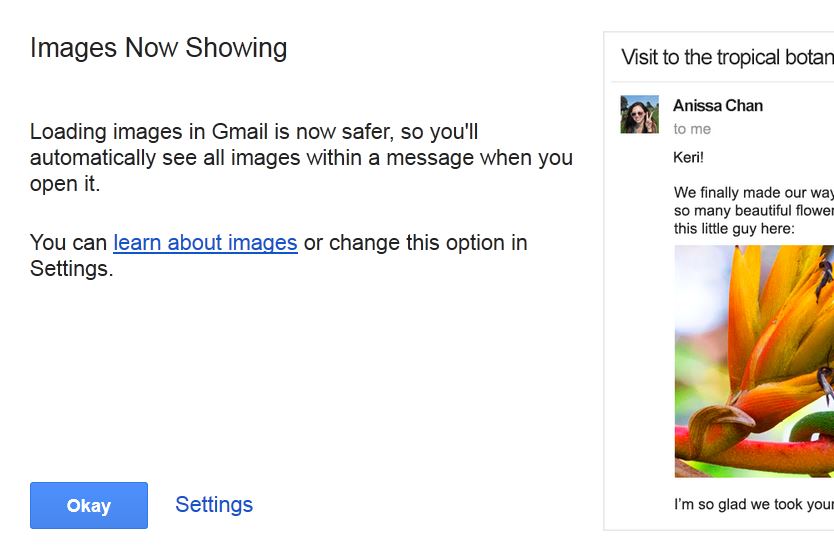
Note that Google has has automatically enabled image downloads with out asking your permission to do so. I did however get this most helpful pop-up notice when I logged into Gmail via the web this morning:

gmail-imageproxy-notice

Google is soft balling this and candy coating the risk in the last paragraph here: https://support.google.com/mail/answer/145919?p=display_images&rd=1

I strongly recommend that all Gmail users blow off Google’s reassurances and restore the “Ask to load images” function to regain better control of their privacy:

gmail-imageproxy-setting

More details on this can be found here:
http://arstechnica.com/security/2013/12/dear-gmailer-i-know-what-you-read-last-summer-and-last-night-and-today/


Thanks to Mako for pointing this out.

The Old Wolf has spoken.

Ms fnd in a lbry… real-time

I previously posted about Hal Draper’s delightful mathematical science-fiction story – the only one he ever wrote – about the challenges of storing and indexing data in ever smaller spaces, requiring ever-larger retrieval indices. But back in 1966, librarians were taking stock of their growing inventories of information, and turning to computers to lend a helping hand… uh, transistor.

SHORPY_15437u

1966. “To the rescue. Many librarians believe computers are the only means to effectively cope with their bulging bookshelves.” New York World-Telegram and Sun Newspaper Photograph Collection, Library of Congress. Found at Shorpy.

This photo was taken three years before I took my first FORTRAN class, on a Univac 1108. The advances I have seen in technology in my lifetime rival what my grandparents experienced moving from horse-and-buggy days to the advent of commercial jets, from radio to television. My smartphone has more processing power than the IBM 370/138 I worked on as a graduate student; I always wonder with white-hot curiosity what my grandchildren will be experiencing.

The Old Wolf has spoken.

An Upvote for Upworthy

Two days ago I posted here about a couple of things at Upworthy’s website that bothered me, and made it an open letter because I couldn’t find any way to contact them on their website.

Today I received a comment from Luigi Montanez, Upworthy’s founding engineer. You can read it over at the original post, but I reproduce it here because it’s deserving of it’s own page.

Hi there, I work for Upworthy. Thanks for taking the time to write out this candid feedback. It’s immensely helpful for us to read.

1a) On the popups: Have you tried clicking the “Don’t show again.” links on them? Once clicked, they’re supposed to suppress those popups in the future. If they’re not working for you, that’s a bug we need to look into. Or if you didn’t notice them, we’ll work on improving their prominence.

1b) On the Facebook friends module: We actually don’t know who your friends are on Facebook. What you’re seeing is called an iframe; it’s a way for us to embed a little bit of the Facebook.com website into our webpage. It’s like a small window into Facebook.com that’s embedded on our page. Facebook never tells us who you are, or who your friends are. Here’s more info:

https://developers.facebook.com/docs/reference/plugins/like/

If we wanted that information, we’d need to ask you to opt-in using Facebook Connect, which we don’t do.

2) Yes, this is a major oversight on our part. Instructions for contacting us are on our About page, but they’re hard to find. Based on your feedback, I created a dedicated Contact page and linked to it in the footer throughout the site:

http://www.upworthy.com/contact

Again, thank you for this. If you have more feedback, please send it our way.

Lots of love,

Luigi
Founding Engineer, Upworthy

This made me sit down astonied.

  1. First of all, someone saw my post. This meant that Upworthy has a social media team or person that is actively scraping the Net for feedback and buzz about their company.
  2. Next, someone answered, meaning that someone cares. In any company in the 21st century, that’s a gold star right off the bat.
  3. Last, Luigi provided constructive suggestions and actually implemented one of my suggestions. I was gobsmacked.

Really, there’s only one possible response:

MorpheusUpvote

Well done, Upworthy.

The Old Wolf has spoken.

The Internet, Someday

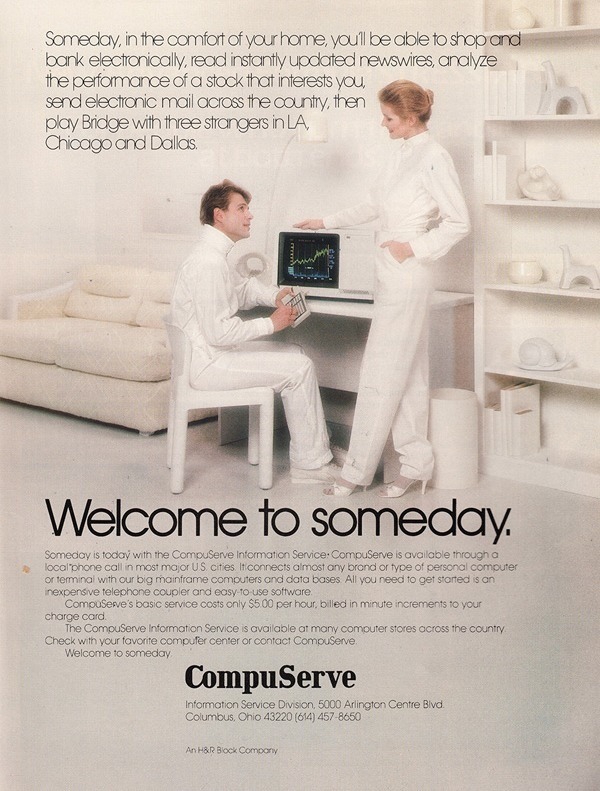
Vintage Compuserve Ad 1982

CompuServe ad, 1982

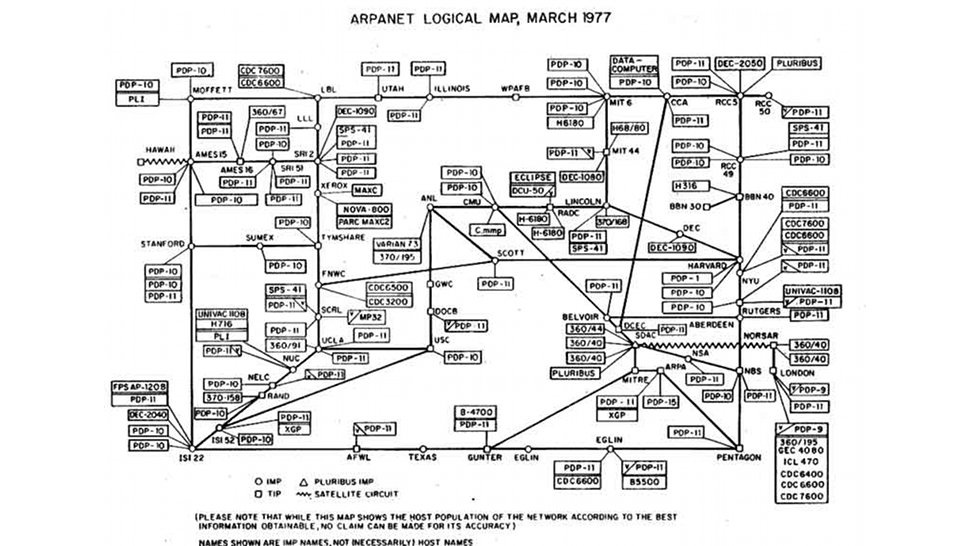
As I commented somewhere else, when I think of how hard it was to connect to the “Internet” as it was back then, using clunky equipment, acoustical 300 baud modems, and processors slower than my current watch, I am astonished at myself for thinking it was all pretty sweet.

images

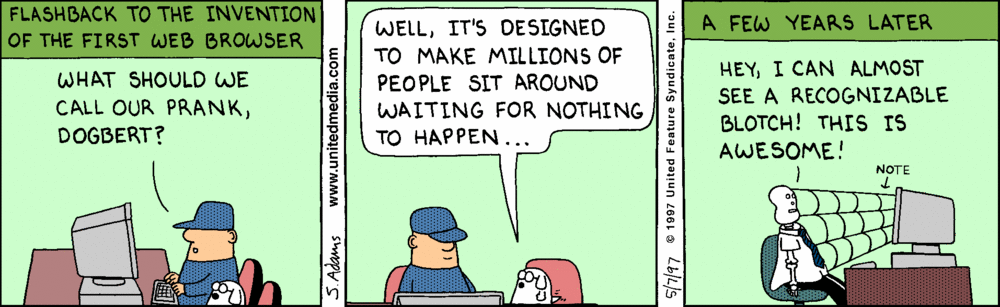
Sitting in front of my Macintosh LC, watching NCSA Mosaic download a progressive jpeg file scan by scan, and still thinking that this was the neatest thing since sliced bread? I realize of course, that it took a while to bring processing speeds and data transfer rates up to where the process could be considered cost-effective:

15146.strip.zoom

This Dilbert strip was from May 7, 1997; check the strips from the previous two days as well, they’re pretty funny in retrospect.

Now, with a core i7 machine and a 50MB internet connection (Pretty sweet, huh? Well, just Google around to see what kind of speeds Korea gets on a regular basis. All things are relative, still) I finally feel as if I have the processing power and download speeds to take care of my basic needs. I don’t do high-overhead gaming or image rendering, so I can’t see really needing anything faster for daily use. [1] But it’s taken us 30 years to get here.

<rant> Of course, I’m composing this post on an HP Pavilion Entertainment laptop, one of the worst purchases I ever made back in 2008. This computer is the piece of hqiz from hell (it was nice to see similar things from Shamus over at Twenty Sided, I felt totally vindicated in my white-hot hatred for Hewlett-Packard); the only thing I can say on its behalf is that five years later, it’s still running and I’ve only had to replace the cheap-john battery twice. I know others who have had much less favorable experiences with this particular line, mainly dead computers. The AMD Turion 64 is probably one of the slowest processors they made back in that day, combined with a pre-installed version of Vista and enough bloatware to delight the most jaded software rep; by the sacred skull of Mogg’s grandfather, I’ve ridden tricycles that could go faster. The kindest thing I ever did for myself was to wipe the whole machine and install Win7 Pro, which virtually doubled the response time… and it’s still slow. I’d like to get the entire corporate chain that designed and approved this abomination and condemn them to a year of using their own garbage… with a dial-up connection.</rant>

But Moore’s Law is still in force. Despite the fact that my work-a-day machine is pretty satisfying to use, I can’t possibly imagine what my two granddaughters, now aged 9 and 6, will have seen by the time they get to be my age. I won’t be alive, and I already envy them.

The Old Wolf has spoken.


[1] Well, I lied. If I were richer than Crœsus, I’d buy a professional system and a really nice video editing package, but that’s just a pipe dream for the present.