Don’t Help the Scammers

There’s an old joke circulating out there that occasionally crops up in people’s inboxes:

You have just received the [Amish/Polish/Aggie, etc.] Virus! Because we don't know
how to program computers, this virus works on the honor system.
Please delete all the files from your hard drive and manually
forward this virus to everyone on your mailing list.
Thanks for your cooperation.

It goes without saying that this would be a Bad Idea. That said, there is a very current scam going on which I ran across yesterday, in which the victim is carefully walked step-by-step through the operations necessary to allow Bad Guys to take control of their computer. I referred to it in a previous post, but here’s the complete run-down.

While researching spoofed and phishing URLs, I decided to use a misspelling of a popular website as an example. I typed in http://www.micorsoft.com (DO NOT DO THIS!) and discovered a rat’s nest of scam operations embedded in this one redirect.

According to WHOIS, the domain is registered thusly:

Domain Name: MICORSOFT.COM
Registrar: EPIK, INC.
Whois Server: whois.epik.com
Referral URL: http://epik.com
Name Server: NS1.DNSLINK.COM
Name Server: NS2.DNSLINK.COM
Status: ok
Updated Date: 19-oct-2014
Creation Date: 13-oct-2001
Expiration Date: 13-oct-2015

Epik is a domain-name registry service, so beyond that I don’t have the chops to dig deeper and see who is really running this operation, but this much I know – they’re wastes of human cytoplasm.

This domain redirects to a number of different scams.

1) You’ve won a prize!

Prize1

Here’s the first popup. The URL is your typical scam alphabet soup address.

Prize2

After answering four inane questions about age, whether you shop on line, gender, etc. you’re presented with this:

Prize3

Well, of course I qualify. You think the scammers would turn down a sucker? No, I didn’t win a prize, I won a “chance” for a grocery gift card. Call the number, and what you hear is “Congratulations! Won a chance to win a gift card!. Stay on the line to complete your entry! Dingdingding your initial entry has been registered, but stay on the line for other additional offers!” You then are bombarded with advertising. Since I used Google Voice to call, there’s no way they could possibly know who is calling or how to contact you if you were really a winner – this is just spamvertising, pure and simple.

2) The Random Cybersquatting Page

Next, i was redirected to this horrific URL:

http://www.searchnet.com/Search/Index?
utm_source=8&utm_campaign=AuctionErrorWithInfo&utm_term=XP%20Home%20Premium;
Microsoft;microsoft;download%20internet%20explorer%2010;microsoft.com;www.microsoft.com;
microsoft%20windows;window%20live%20messenger;servers%20xp;microsoft%20help%20support;
microsoft;microsoft%20help%20center;online%20ms%20training;
microsoft%20programs;xp%20small%20business%20edition%20;downloads;
microsoft.com;windows%20updates&utm_medium=Ciclostare32

User Nokkenbuer at WOT (Web of Trust) posted on 09/21/2014:

  • I don’t trust
  • Malware or viruses
  • Poor customer experience
  • Scam
  • Misleading claims or unethical
  • Privacy risks
  • Suspicious
  • Spam
  • Potentially unwanted programs

This website was involved in redirecting me to a malicious site after accessing a typosquatter website (http://www.micorsoft.com/). I do not trust it and may aid in infecting your computer with unwanted malware, spyware, or grayware.”

By the way, if you don’t have the WOT extension on your computer, I’d recommend it. It gives you advance warning of sites that have been flagged as malicious, like this:
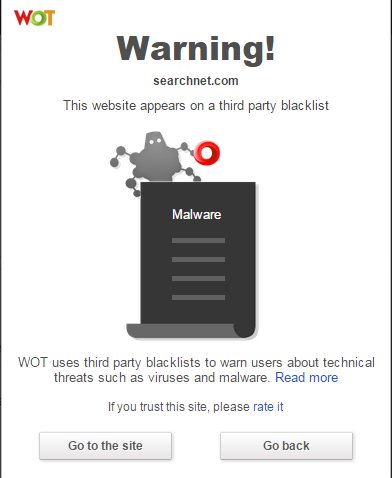
Wot1

For any site, you can always “read more” to see what users have said. It’s wise to do, because on occasion a website was flagged early for suspicious behavior, but domains change hands and it could be a legitimate site at the present time. User comments will usually reflect this. At all events, you have the option of leaving before you actually visit a potentially dangerous website. Sign up, and you can leave your own feedback for websites as well.

3) Is Your Computer Running Slowly?
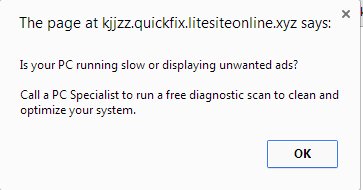
slow1

If you click OK, you’re directed to this page:
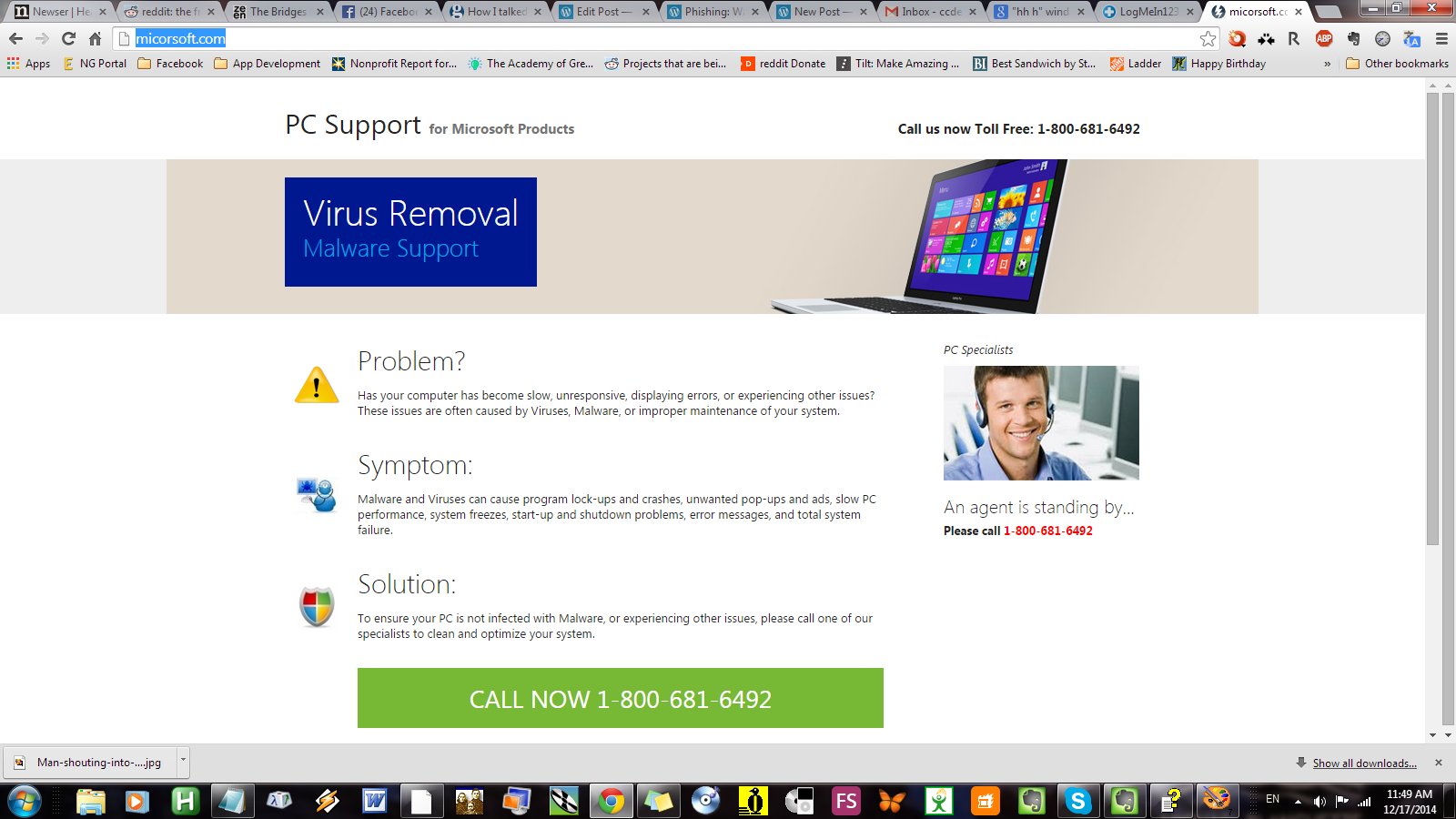
 Slow2

This one looks slick and official, but it’s a solid guarantee that if you call that toll-free number, you’re at risk for being scammed or having your computer infected or both.

4) The Scare Tactic

This is the one I referred to in my earlier post, and today I followed up on the game to see how it plays out.

Viruse2

This page is a little different than the first one I encountered; it doesn’t mention specific viruses, but includes an annoying, repeating, and loud chirp to add urgency to the scam. If you try to navigate away from the page, you get this:

virus1

If you bite and call the number (855- 979-7382) you will be connected to a polite-sounding Indian or Pakistani boiler-room worker who will engage you as follows:

  1. I was asked kind of problems you are experiencing, what kind of computer I am running, and what my operating system is.
  2. On a Win7 box (your mileage may vary for other operating systems) I was asked to hit “Windows-R” to open the Run dialog, and then type in “MSConfig” and hit enter. This is harmless, but displays running services on your computer.
  3. I was asked if more than 15 services were stopped?
  4. I responded that yes, more than 15 services were stopped.
  5. The agent informed me that since more than 20% of my services were stopped, my system was vulnerable to application errors. Once Windows 7 has services stopped, that is the main problem. This, of course, is utter bulldust, but is technobabble enough to flummox most callers who get this far.
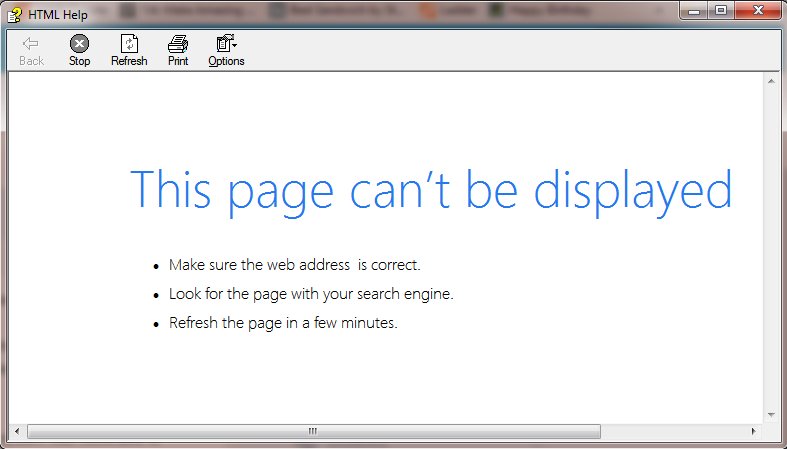
  6. I was told that we need to check why these services are stopped. Again directed to the “Run” dialog, I was instructed to type in “hh h” and hit “Enter”. This brings up the HTML Help Window, which “Cannot be Displayed.”
    Help1
  7. I was instructed to hover my mouse over the little question-mark icon in the window, and select the “Jump to URL” option.
    Help2
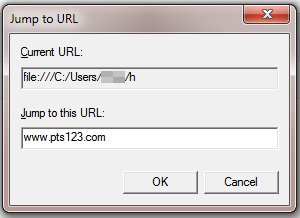
  8. I am presented with a dialog box, and asked to enter the specified URL:
    Scam3
    N
    ote: This is a sneaky way to get you to visit a website, instead of typing it directly in the URL bar.
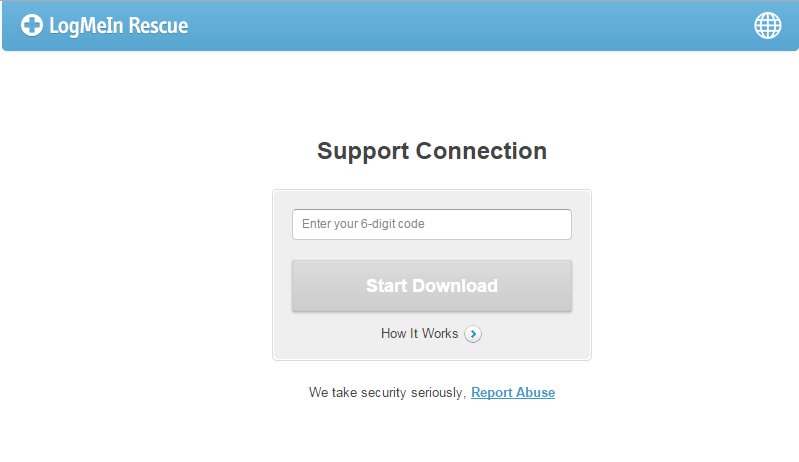
  9. Once this is done, I am directed to this website: https://secure.logmeinrescue.com/customer/code.aspx
    Login
    This is a website which allows outside users to take control of your computer, usually for tech support reasons. If you trust the party on the other end it can be useful, although I prefer to use TeamViewer.
  10. Before proceeding, the agent had me run inetcpl.cpl, click on the connections tab, and ensure that no proxy was being used.
  11. Having done this, the agent instructed me to enter the code 941073, and hit “Enter.” He asked me what I saw on my screen.
  12. At this point, I told him the only thing I saw was myself closing Chrome, because I had no intention to give control of my machine to a bunch of scammers, and hung up.
There are enough methods out there that the Bad Guys can infect your computer if you’re not careful, but helping them with the process is generally a Lousy Idea.

Be careful out there.

The Old Wolf has spoken.
Notice to Appear in Court (Scam/Malware)

bigstock-Malicious-malware-warning-mess-41722204-1024x819

(Thanks to Techsrus for the image)

My cubicle neighbor (at the job we just both got laid off from yesterday, but that’s another story) showed me a couple of emails he had gotten in his Gmail account – each sported the header “Notice to Appear in Court.”  I told him they were probably scam threat letters and hoping to extort money.

I got one myself today, and decided to explore it a little further.

—————-

From: “Notice to Appear in Court” <customerssupport231@kaiserarbitrationlawyers.com>
To: <redacted>

Subject: Notice to appear in court SN8157

Notice to appear in court,

Hereby you are notified that you have been scheduled to appear for your hearing that will take place in the court of Detroit in April 03, 2014 at 11:30 am.You are kindly asked to prepare and bring the documents relating to the case to court on the specified date.The copy of the court notice is attached to this letter. Please, read it thoroughly.
Note: The case may be heard by the judge in your absence if you do not come.Yours very truly,
SAMPSON Hays
Clerk of court
—————————–
Attached was a file called “Notice_to_Appear_TY4769.zip”
Unpack this zip folder and you find a file called “Court Notice.exe”. That file lasted less than one second on my desktop, as Microsoft Security Essentials immediately quarantined it. The .exe file contained a Trojan Downloader named Win32/Kuluoz.D, which Microsoft describes as follows:
Win32/Kuluoz is a trojan that tries to steal passwords that are stored in certain applications and sensitive files from your PC. This trojan could also download other malware to your PC, like other variants of Win32/Kuluoz and Win32/Sirefef, and variants of rogue security software likeWin32/FakeSysdef and Win32/Winwebsec. This threat tries to hack your email accounts and file transfer programs.
In other words, really nasty stuff.
This is a perfect example of why you should do the following things on your computer to practice safe computing:

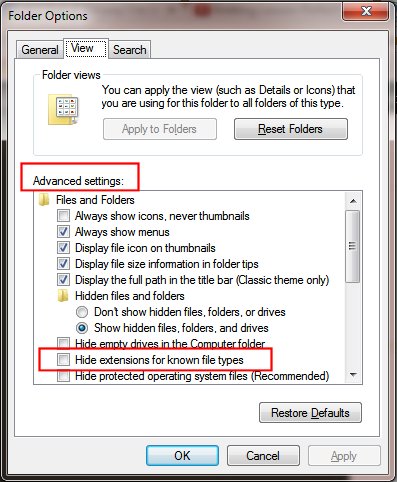
1. Always display file extensions. This option is turned off by default by Microsoft on its newer operating systems, which in my opinion is a dangerous and foolhardy idea. This means that instead of seeing “Notice_to_Appear_TY4769.zip” and “Court Notice.exe”, you would only see “Notice_to_Appear_TY4769” and “Court Notice.” To fix this, follow the procedure below for your operating system:

To show or hide file name extensions (Windows 7)

  1. Open Folder Options by clicking the Start button Picture of the Start button, clicking Control Panel, clicking Appearance and Personalization, and then clicking Folder Options.

  2. Click the View tab, and then, under Advanced settings, do one of the following:

    • To show file name extensions, clear the Hide extensions for known file types check box, and then click OK.

    • To hide file name extensions, select the Hide extensions for known file types check box, and then click OK.

Example

To show or hide file name extensions (Windows 8)

  • Open Windows Explorer and go to “View” and then click the Options button > Change folder and search options
  • Scroll to “Hide extensions for file types is known”
  • Uncheck it and click OK.

To show or hide file name extensions (Windows XP)

  • Double Click on My Computer.
  • Click on Tools > Folder Options… in the menus.
  • Click on the View tab.
  • Remove the check from Hide extensions for known file types.
  • Click the OK button.

2) Make sure you have robust malware detection software installed. AVG Free, Microsoft Security Essentials, and Kaspersky are all good options. The first two are free, the third reasonably priced and somewhat more robust than the other two.

3) ☞ NEVER ☜ open attachments from unknown senders, especially a file that contains “.exe” anywhere in its name.

(Did I make that emphatic enough? I’d make it blink if I could.)

A lot of folks are savvy enough to spot this as a scam in an instant, but this particular email is official-looking enough to scare a lot of vulnerable computer users; the scammers don’t care if you actually appear anywhere – they just want you to open that never-to-be-sufficiently-damned attachment. If you are technically savvy and you have loved ones, either elderly or otherwise vulnerable, watch out for them. Educate them. You don’t want them becoming victims of scams or nefarious behavior like botnets.

This has been an Old Wolf public service announcement.

Practice Safe Computing!

This can’t be stressed enough, or repeated often enough. Just got an email today in my business account that looked like this:

Dear Sir/Madam,

The attached payment advice is issued at the request of our customer.

The advice is for your reference only.

Yours faithfully,
Global Payments and Cash Management
HSBC

***************************************************************************

This is an auto-generated email, please DO NOT REPLY. Any replies to this email will be disregarded.

***************************************************************************
Security tips

1. Install virus detection software and personal firewall on your
computer. This software needs to be updated regularly to ensure you
have the latest protection.
2. To prevent viruses or other unwanted problems, do not open
attachments from unknown or non-trustworthy sources.
3. If you discover any unusual activity, please contact the remitter of
this payment as soon as possible.
***************************************************************************

*******************************************************************
This e-mail is confidential. It may also be legally privileged.
If you are not the addressee you may not copy, forward, disclose
or use any part of it. If you have received this message in error,
please delete it and all copies from your system and notify the
sender immediately by return e-mail.

Internet communications cannot be guaranteed to be timely,
secure, error or virus-free. The sender does not accept liability
for any errors or omissions.
*******************************************************************
“SAVE PAPER – THINK BEFORE YOU PRINT !

ttcopy.zip


Unfortunately, far too many people will be stung by a generic sounding email like this. “Wow, someone sent me money!” will be the initial response, and they’ll happily unzip and execute the attached “payment notice.”

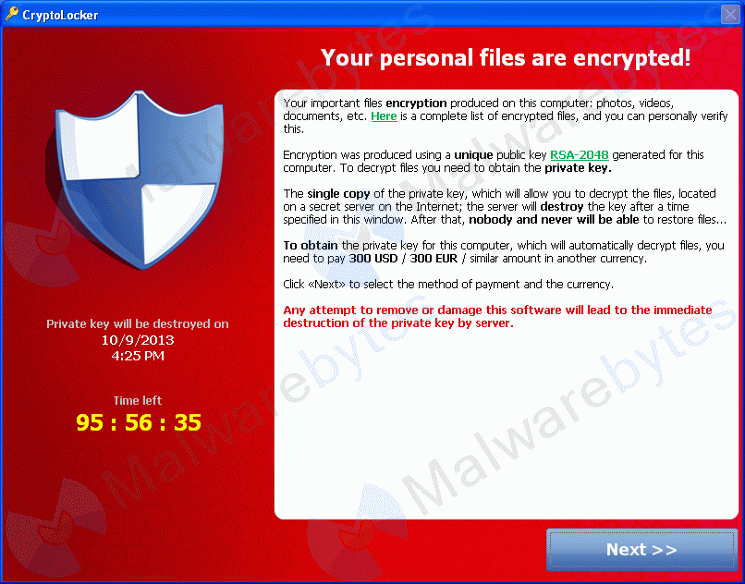
Unfortunately that attached file is not a payment notice, but an executable file (a program) which will infect your computer with malware, adware, spyware, and heaven knows what else; turn your machine into part of a robotic network (a botnet) for spreading spam and viruses, search for passwords and sensitive financial data, encrypt all your files and demand a ransom to unlock them (this is a particularly nasty one), or any number of other unholy things.

cryptolocker

I’m going to shout here: NEVER OPEN EMAIL ATTACHMENTS FROM PEOPLE YOU DO NOT KNOW AND TRUST!111

If WordPress supported blinking text, I’d use that obnoxious tag too, just to make sure I had your attention.

Be especially wary of any file that ends in “.exe”. This is one of the basic rules of safe computing, but far too many people don’t know about it. One of the worst things Microsoft ever did was to suppress the display of file extensions by default, assuming people didn’t care or wouldn’t understand what they are for. As a result, far too many people are simply ignorant of the dangers inherent in clicking email attachments that could be programs. All they would see in the above message would be “ttcopy.”

Notice the ironic security warning in the body of the email itself: “To prevent viruses or other unwanted problems, do not open
attachments from unknown or non-trustworthy sources.” This is misdirection at its finest; people will be grateful for the warning, if they even bother to read it, and happily execute the malicious payload.

The executive summary here: NEVER OPEN EMAIL ATTACHMENTS FROM PEOPLE YOU DO NOT KNOW AND TRUST!

The Old Wolf has spoken.

Going on a phishing trip

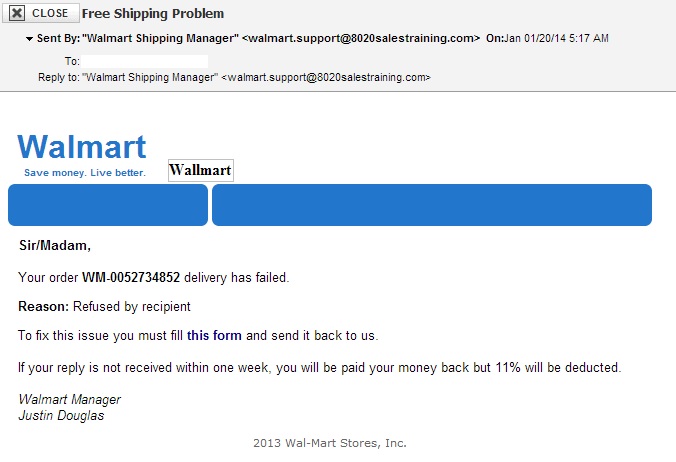
Scam Warning: Free Shipping Problem

Scam Email

This email appeared in my inbox overnight. It’s a scam, of course, but sadly many people will be taken in by it.

Why is this a scam?

  • First of all, I haven’t ordered anything from Walmart, ever.
  • Next, the mail was sent from “8020salestraining.com,” not “walmart.com.”
  • Third, notice the secondary text “Wallmart,” an obvious mis-spelling.
  • Fourth, notice the lousy English: “you must fill this form,” “you will be paid your money back.”
  • Lastly, if you happen to click the “this form” link, you are downloading a zip file called “WalmartForm_Richfield_84701.zip” – and if you unpack that, you get “WalmartForm_Richfield_84701.exe

That last one is the biggest red flag of all: the first rule of safe computing is NEVER RUN ATTACHED EXE FILES. That’s a program, and it will either gather financial details and forward it to scammers, or install malware/adware/viruses/trojans on your system, or something else, or all of the above. Many people don’t enable the display of file extensions, so they would never know they’re opening a malicious program.

There are more scams out there than you can shake a stick at. Practice safe computing – never download or open attachments unless you are sure you know from whom they are coming. Be careful with your financial details. Never send banking or credit card information via email. Avoid sending money to anyone unknown via Western Union or Money Card. And never pay money to collect a prize, especially from a contest you have not entered.

Be careful out there.

The Old Wolf has spoken.